
If you want a complete drive that is ready to plug in, the Addlink P30 is the pick that matches this keyword most directly, with a stated 4000 MB/s read figure over USB4 and Thunderbolt 4 compatibility, while the OWC Express 1M2 and the UGREEN enclosure suit readers who already own an NVMe SSD and want to build their own external drive. The two 4TB complete drives in this group, the SABRENT Rocket Nano XTRM and the SanDisk Professional PRO-G40, are Thunderbolt 3 drives rather than Thunderbolt 4 drives, so they belong here as high-capacity alternatives with a different interface, not as Thunderbolt 4 picks.
We compared all five on the figures their listings give: stated read and write speeds, interface, capacity, supported M.2 sizes, dimensions, weight and protection ratings. Two of the five are enclosures with no SSD included, one complete drive carries conflicting capacity figures in its listing, and the two Thunderbolt 3 drives trade interface speed for 4TB of ready-to-use storage. Reading the stated numbers first keeps the choice grounded, because the fastest stated figure and the largest stated capacity sit on different products, and the smallest body does not belong to the drive with the highest stated speed.
As an Amazon Associate, we earn from qualifying purchases.


Pick by Your Need
- Best overall: Addlink P30 USB4 External SSD. It lists the highest stated read figure among the five at 4000 MB/s and arrives as a complete drive.
- Best enclosure for a drive you already own: OWC Express 1M2 Enclosure. It accepts NVMe M.2 SSDs in 2280, 2242 and 2230 sizes and lists up to 3836 MB/s real-world performance.
- Best enclosure for large drives: UGREEN 40Gbps M.2 NVMe Enclosure. It supports drives up to 8TB and four M.2 sizes, the broadest size range of the two enclosures.
- Best compact 4TB option: SABRENT Rocket Nano XTRM 4TB. Its body measures 2.95 x 1.34 x 0.71 inches and weighs 1.69 oz, with both cables included.
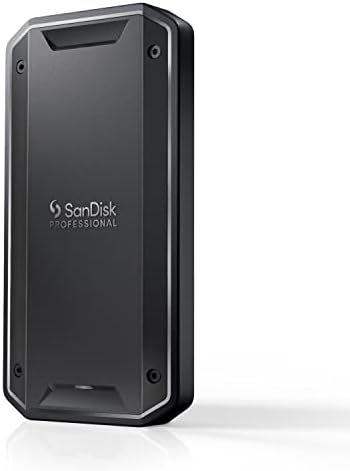
- Best rugged option: SanDisk Professional PRO-G40 4TB SSD. It carries an IP68 rating with 4000 lb crush resistance and 3 m drop resistance.
Quick Answer
The Addlink P30 is the closest match to the keyword as a complete USB4 drive with Thunderbolt 4 compatibility and a stated 4000 MB/s read figure, though its listing gives conflicting capacity figures that you should confirm on the product page. Readers who already own an NVMe SSD can build around the OWC Express 1M2 or the UGREEN enclosure, while the 4TB SABRENT Rocket Nano XTRM and SanDisk PRO-G40 are Thunderbolt 3 drives, not Thunderbolt 4 drives, with the SanDisk standing out on IP68 protection.
Comparison Table
| Product | Stated read speed | Capacity | Interface | Size and weight | Buy |
|---|---|---|---|---|---|
| OWC Express 1M2 Enclosure | Up to 3836 MB/s | Enclosure only, SSD not included | USB4, Thunderbolt, USB-C | 5.1 x 0.9 x 2.7 in; 0.62 lb | View on Amazon |
| UGREEN 40Gbps M.2 NVMe Enclosure | Up to 3600 MB/s | Enclosure only, SSD not included | Thunderbolt 4/3, USB4 | 4.8 x 2.6 x 1.06 in; 0.51 lb | View on Amazon |
| Addlink P30 USB4 External SSD | 4000 MB/s | 2TB in one part of the listing; 1TB (up to 4TB options) in another part | USB4, Thunderbolt 4 compatible | 2.52 x 2.52 x 0.47 in; 45 g | View on Amazon |
| SABRENT Rocket Nano XTRM 4TB | Up to 2700 MB/s | 4TB | Thunderbolt 3 | 2.95 x 1.34 x 0.71 in; 1.69 oz | View on Amazon |
| SanDisk Professional PRO-G40 4TB SSD | Up to 3000 MB/s | 4TB | Thunderbolt 3 | 4.36 x 2.28 x 0.47 in; 0.27 lb | View on Amazon |
Decision Guide
Start with the port on your computer, because it decides which stated speed you can actually reach. The Addlink P30 runs over USB4 with Thunderbolt 4 compatibility, the UGREEN enclosure works with Thunderbolt 4 and Thunderbolt 3 plus USB4, USB 3.2, USB 3.1, USB 3.0 and USB 2.0, and the OWC enclosure works with USB4, Thunderbolt and USB-C computers and devices. The SABRENT and the SanDisk are Thunderbolt 3 drives, so a Thunderbolt 4 port is not required for them, but neither one gives you a Thunderbolt 4 connection. If your computer has only a plain USB-C port, the UGREEN enclosure still connects, the OWC enclosure still connects, and the SABRENT falls back to USB 3.2 Gen 2 at up to 900 MB/s, while the SanDisk runs over USB-C at 10 Gbps.
If you already own an NVMe SSD, choose an enclosure and compare the two on size support and speed. The UGREEN enclosure takes 2230, 2242, 2260 and 2280 sizes and supports drives up to 8TB, so it covers the widest range of drives and the largest stated drive capacity of the two enclosures. The OWC enclosure takes 2280, 2242 and 2230 sizes, one fewer size than the UGREEN, and lists up to 3836 MB/s real-world performance, above the UGREEN maximum of 3600 MB/s. Both are enclosures only, so the SSD is not included with either one, and the final capacity depends on the drive you fit. The UGREEN listing adds that Thunderbolt 4 cables and devices are required to reach its 3600 MB/s figure, and that it does not support SATA NGFF or mSATA drives, so confirm your drive type before choosing.
If you want a complete drive with no assembly, the Addlink P30 is the only one in the group with Thunderbolt 4 compatibility and a stated 4000 MB/s read figure. Its listed write figure is 3600 MB/s, which matches the UGREEN maximum and sits above the SanDisk write figure of 2500 MB/s. Before choosing it, confirm the capacity on the product page, because one part of the listing gives 2TB while another part states 1TB capacity with up to 4TB options, and the weight figures differ too, with the description giving 45 g and the spec table listing 0.4 pounds. The 3-year warranty and the credit-card compact aluminum design are stated in the listing, and MagSafe support for iPhone ProRes recording is listed as a feature.
If you want 4TB ready to use and you accept a Thunderbolt 3 connection, compare the SABRENT and the SanDisk on speed, size and protection. The SanDisk lists up to 3000 MB/s read and 2500 MB/s write, above the SABRENT at up to 2700 MB/s, and it carries IP68 dust and water resistance, 4000 lb crush resistance and 3 m drop resistance on a carpeted concrete floor, which no other product in the group states. The SABRENT body measures 2.95 x 1.34 x 0.71 inches at 1.69 oz, shorter than the SanDisk at 4.36 inches long, and it includes both a Thunderbolt/USB-C cable and a USB-C to USB-A cable, so no extra cable purchase is needed. The SanDisk weighs 0.27 pounds, which is lighter than either enclosure, and its aluminum core is described as pulling heat away from the internal drive. The SABRENT coverage is 3 years standard, extendable to 5 years free with registration within 90 days, while the Addlink P30 lists a 3-year warranty.
If size matters most, measure the stated dimensions against the space you have. The Addlink P30 is listed at 2.52 x 2.52 x 0.47 inches, the SABRENT at 2.95 x 1.34 x 0.71 inches, the SanDisk at 4.36 x 2.28 x 0.47 inches, the UGREEN at 4.8 x 2.6 x 1.06 inches and the OWC at 5.1 x 0.9 x 2.7 inches. The OWC is the longest at 5.1 inches, the heaviest at 0.62 pounds and the thickest at 2.7 inches. The Addlink P30 at 45 g by the description figures is the lightest complete drive in the group, and the SABRENT at 1.69 oz is lighter than the SanDisk at 0.27 pounds. On power, the listings state only that the OWC is bus-powered and that the SABRENT is bus-powered with no power adapter needed, while the UGREEN, Addlink and SanDisk listings state no power arrangement.
1. OWC Express 1M2 Enclosure — Best enclosure for a drive you already o
The OWC Express 1M2 is the only option here built around a patented heat-dissipating aluminum design, and it lists up to 3836 MB/s real-world performance over its 40 Gb/s connection, which sits below the Addlink P30 at 4000 MB/s read but above the UGREEN enclosure at 3600 MB/s and both Thunderbolt 3 drives. It accepts NVMe M.2 SSDs in 2280, 2242 and 2230 sizes, one fewer size than the UGREEN enclosure, which also takes 2260. At 5.1 x 0.9 x 2.7 inches and 0.62 pounds it is the longest and the heaviest of the five in the listed dimensions. The trade-off is plain: this is an enclosure only, so the SSD is not included and the final capacity depends on the drive you fit, and the 40 Gb/s USB-C cable and screwdriver are included in the box.
| Spec | From the listing |
|---|---|
| Interface | USB4, Thunderbolt and USB-C compatible; 40 Gb/s |
| Stated speed | Up to 3836 MB/s real-world performance |
| Supported SSD sizes | NVMe M.2 2280, 2242, 2230 |
| Dimensions | 5.1 x 0.9 x 2.7 inches |
| Weight | 0.62 pounds |
| Capacity | The listing does not state it |
2. UGREEN 40Gbps M.2 NVMe Enclosure — Best enclosure for large drives
The UGREEN enclosure lists a maximum speed of 3600 MB/s through its ASM2464PD chip, which is below the OWC at 3836 MB/s and the Addlink P30 at 4000 MB/s read, and it needs Thunderbolt 4 cables and devices to reach that 3600 MB/s figure. Its widest advantage is drive support: it takes 2230, 2242, 2260 and 2280 sizes, the broadest size range of the two enclosures, and it supports drives up to 8TB, the largest stated drive capacity of the two enclosures. At 4.8 x 2.6 x 1.06 inches and 0.51 pounds it is the second longest of the five, while its 1.06-inch height sits below the OWC at 2.7 inches, and like the OWC it is an enclosure only, so the SSD is not included and you must supply your own NVMe drive.
| Spec | From the listing |
|---|---|
| Interface | USB4, USB 3.2/3.1/3.0/2.0 and Thunderbolt 3/4 |
| Stated speed | Up to 3600 MB/s |
| Supported SSD sizes | 2230, 2242, 2260, 2280 |
| Maximum drive capacity | Up to 8TB |
| Dimensions | 4.8 x 2.6 x 1.06 inches |
| Weight | 0.51 pounds |
3. Addlink P30 USB4 External SSD — Best ready-to-use Thunderbolt 4 drive
The Addlink P30 is the only complete drive here built around USB4 with Thunderbolt 4 compatibility, and it lists 4000 MB/s read and 3600 MB/s write, the highest stated read figure among the five. One part of the listing gives 2TB, while another part states 1TB capacity with up to 4TB options, so the two capacity figures conflict, and you should check the product page before choosing, because this guide does not pick one figure over the other. At 64 mm by 12 mm and 45 g it is the lightest complete drive in the group by the description figures, and the listing describes it as credit-card compact with an aluminum case, MagSafe support for iPhone ProRes recording and a 3-year warranty, while the spec table lists its weight as 0.4 pounds, which differs from the 45 g figure, so check the product page for the weight too.
| Spec | From the listing |
|---|---|
| Interface | USB4, Thunderbolt 4 compatible |
| Stated speed | 4000 MB/s read, 3600 MB/s write |
| Capacity | 2TB in one part of the listing; 1TB (up to 4TB options) in another part, check the product page |
| Dimensions | 2.52 x 2.52 x 0.47 inches |
| Weight | 45 g in the description; 0.4 pounds in the spec table |
| Warranty | 3-year warranty |
4. SABRENT Rocket Nano XTRM 4TB — Best compact 4TB Thunderbolt 3 drive
The SABRENT Rocket Nano XTRM is a Thunderbolt 3 drive, not a Thunderbolt 4 drive, so readers who need a Thunderbolt 4 connection should look at the Addlink P30 or one of the two enclosures instead. It lists up to 2700 MB/s over its 40 Gbps Thunderbolt 3 interface and falls back to 900 MB/s over USB 3.2 Gen 2, the lowest stated read figure among the five. Its 4TB capacity matches the SanDisk PRO-G40, and its body measures 2.95 x 1.34 x 0.71 inches at 1.69 oz, which makes it lighter than the SanDisk PRO-G40 at 0.27 pounds, with an aluminum body, an included silicone sleeve and both cables in the box, plus 3-year coverage extendable to 5 years free with registration within 90 days. The description gives the body as 2.95 x 1.34 x 0.71 inches, while the spec table lists the width as 0.71 inches, so check the product page for the exact width.
| Spec | From the listing |
|---|---|
| Interface | Thunderbolt 3 (40 Gbps); USB 3.2 Gen 2 fallback |
| Stated speed | Up to 2700 MB/s; up to 900 MB/s over USB 3.2 Gen 2 |
| Capacity | 4TB |
| Dimensions | 2.95 x 1.34 x 0.71 inches |
| Weight | 1.69 oz |
| Coverage | 3-year standard coverage, extendable to 5 years free |
5. SanDisk Professional PRO-G40 4TB SSD — Best rugged 4TB Thunderbolt 3 drive
The SanDisk Professional PRO-G40 is also a Thunderbolt 3 drive, not a Thunderbolt 4 drive, so it does not match the keyword on interface even though it lists up to 3000 MB/s read and 2500 MB/s write over Thunderbolt 3 at 40 Gbps. That stated read figure sits above the SABRENT at 2700 MB/s but below the Addlink P30 at 4000 MB/s read, and it drops to USB-C at 10 Gbps when Thunderbolt is not available. Its 4TB capacity matches the SABRENT, and at 4.36 x 2.28 x 0.47 inches and 0.27 pounds it is longer than the SABRENT but lighter than both enclosures. Its standout numbers are protection figures: IP68 dust and water resistance, 4000 lb crush resistance and 3 m drop resistance on a carpeted concrete floor, which no other product in the group states.
| Spec | From the listing |
|---|---|
| Interface | Thunderbolt 3 (40 Gbps); USB-C (10 Gbps) |
| Stated speed | Up to 3000 MB/s read, 2500 MB/s write |
| Capacity | 4TB |
| Dimensions | 4.36 x 2.28 x 0.47 inches |
| Weight | 0.27 pounds |
| Resistance | IP68 dust/water; 4000 lb crush; 3 m drop |
Buying Checklist
- Confirm your computer port first: Thunderbolt 4, Thunderbolt 3, USB4 or USB-C, and match it to the interface each listing gives.
- For an enclosure, confirm your SSD is an NVMe M.2 drive in a supported size, and remember the UGREEN enclosure does not support SATA NGFF or mSATA drives.
- Measure the space where the drive will sit and compare the stated dimensions and weight, from 2.52 inches long for the Addlink P30 to 5.1 inches long for the OWC enclosure.
- Check the stated capacity on the product page, especially for the Addlink P30, where the listing gives conflicting figures.
- Check the stated coverage and registration terms on the product page before you buy, including the SABRENT 5-year extension that needs registration within 90 days.
FAQ
Do I need a Thunderbolt 4 port to use these drives?
No, only some of them use Thunderbolt 4. The Addlink P30 runs over USB4 with Thunderbolt 4 compatibility, the UGREEN enclosure works with Thunderbolt 4 and Thunderbolt 3 plus USB4 and older USB versions, and the OWC enclosure works with USB4, Thunderbolt and USB-C. The SABRENT and the SanDisk are Thunderbolt 3 drives with USB fallbacks, so they connect without a Thunderbolt 4 port, though their stated speeds are lower than the Addlink P30.
Should I buy an enclosure or a complete drive?
Buy an enclosure if you already own an NVMe SSD and want to choose the capacity yourself, with the UGREEN enclosure covering four M.2 sizes and drives up to 8TB and the OWC enclosure covering three sizes with up to 3836 MB/s real-world performance. Buy a complete drive if you want storage that is ready to plug in, with the Addlink P30 as the Thunderbolt 4 option and the SABRENT and SanDisk as 4TB Thunderbolt 3 options. Enclosures ship without a drive, so the SSD is an extra part you must supply.
How do I choose between the two 4TB drives?
Compare speed, size and protection. The SanDisk PRO-G40 lists up to 3000 MB/s read and 2500 MB/s write, above the SABRENT at up to 2700 MB/s, and it adds IP68 dust and water resistance, 4000 lb crush resistance and 3 m drop resistance. The SABRENT body measures 2.95 x 1.34 x 0.71 inches at 1.69 oz, shorter than the SanDisk at 4.36 inches long, and it includes both a Thunderbolt/USB-C cable and a USB-C to USB-A cable, while both are Thunderbolt 3 drives with no Thunderbolt 4 connection.
Final Verdict
The Addlink P30 is the strongest match to the keyword as a complete USB4 drive with Thunderbolt 4 compatibility and a stated 4000 MB/s read figure, provided you confirm its conflicting capacity figures on the product page first. Readers who already own an NVMe SSD get more control from the OWC Express 1M2 or the UGREEN enclosure, with the UGREEN covering more sizes and drives up to 8TB. Readers who want 4TB ready to use can take the SABRENT Rocket Nano XTRM for its compact body and included cables, or the SanDisk PRO-G40 for its IP68 protection and higher stated read figure, keeping in mind that both are Thunderbolt 3 drives.
Prime covers fast, free delivery on eligible items. See whether a Prime free trial is available for your account.
Check Prime on Amazon →Types of External SSDs
External SSDs are grouped mainly by connection speed and by build durability.
USB 3.2 Gen 1 drives (up to roughly 5Gbps) are the most common, affordable tier. USB 3.2 Gen 2 and Gen 2x2 drives support higher transfer speeds, but only reach those speeds with a compatible port and cable on the host device. Rugged/water-resistant drives add a protective shell and IP rating for travel or outdoor use. NVMe-based enclosures use the same fast flash memory as internal NVMe drives, generally outperforming SATA-based external SSDs.
An external SSD's rated speed is a best-case figure — the actual transfer speed is capped by the slowest link in the chain, including the host computer's port, the cable used, and the file sizes being transferred.
Frequently Asked Questions
What's the real-world speed difference between USB 3.2 Gen 2 and older external SSDs?
Gen 2 supports roughly double the theoretical bandwidth of Gen 1, but the actual speed gain only shows up if the host device's port and the cable used both support the same Gen 2 standard.
Is an external SSD actually faster than an external hard drive?
Yes, generally — SSDs have no moving parts and much faster read/write speeds than spinning hard drives, especially for random access rather than large sequential transfers.
Does an external SSD need a specific cable/port to hit full speed?
Yes — the drive's rated speed assumes a matching port and cable; plugging a high-speed external SSD into an older, slower USB port caps it at that port's maximum speed.
Related Guides
 external hard drive durableFive external hard drives compared on capacity, interface speed, weight and Mac support, so…Read next →
 external hard drive large capacityFive large desktop hard drives from 18TB to 24TB compared on stated capacity, size,…Read next →
 Best Sabrent USB-C Hub: 5 Picks for Ports and PowerFive Sabrent hubs compared: four USB-C models with 4K HDMI, 10Gbps ports and PD…Read next →





Write Your Review
No reviews yet. Be the first to share your experience!