
Pick the Redragon S107 if you want the deepest control, with software-set mouse DPI up to 10000 and 25-key anti-ghosting, or the Trueque if a wireless desk matters more, since it is the only cord-free set here. The other three wired combos split by shape and extras: two 104-key sets from BlueFinger and RedThunder, and one compact 68-key set from GEODMAER.
All five sets are genuine keyboard and mouse combos, and every listing states RGB lighting in its facts, so nothing here is a partial match on the combo or the lighting. The real differences are connection type, key count, mouse DPI ceiling, and which extras come in the box.
As an Amazon Associate, we earn from qualifying purchases.



Pick by Your Need
- Best overall: Redragon S107. Software raises its mouse to 10000 DPI, with 25-key anti-ghosting.
- Best wireless: Trueque combo. One 2.4GHz receiver links both devices, range up to 33 ft.
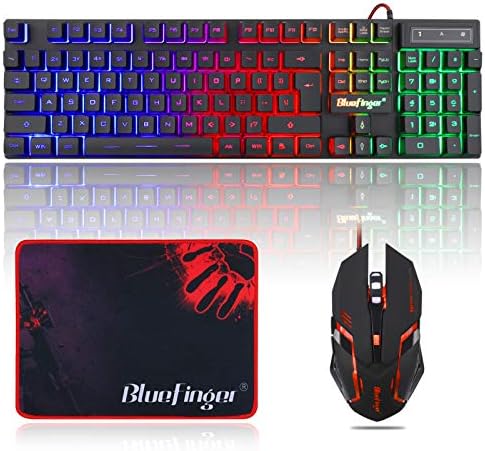
- Best complete set: BlueFinger combo. A mouse pad sized 11.8 x 9.8 inches comes in the box.
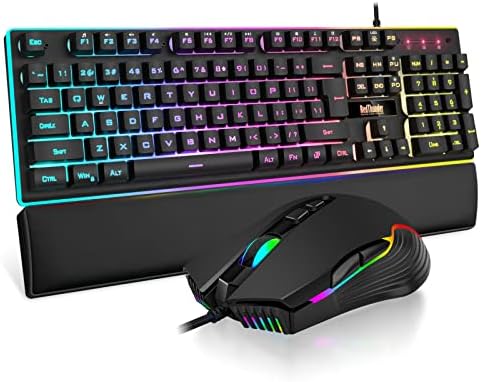
- Best with wrist rest: RedThunder K10. It is the only set here that includes a wrist rest.
- Best for small desks: GEODMAER combo. The 68-key board measures 15.0 inches long, with no numeric keypad.
Quick Answer
All five combos pair a backlit RGB keyboard with a matching mouse, and four are wired while the Trueque alone is wireless. Mouse DPI ceilings run from 2000 on the BlueFinger to 10000 on the Redragon through its software, and only the Redragon and GEODMAER listings state a weight, at 2.05 and 1.4 pounds.
Comparison Table
| Product | Connection | Keys | Mouse max DPI | Weight | Buy |
|---|---|---|---|---|---|
| BlueFinger combo | Wired USB | 104 | 2000 | not stated | View on Amazon |
| Trueque combo | 2.4GHz wireless | Full-size | not stated | not stated | View on Amazon |
| RedThunder K10 | Wired | 104 | 7200 | not stated | View on Amazon |
| Redragon S107 | Wired | not stated | 10000 via software | 2.05 pounds | View on Amazon |
| GEODMAER combo | Wired | 68 | 7200 | 1.4 pounds | View on Amazon |
Decision Guide
Start with the connection. If you dislike cable clutter, the Trueque is the only wireless pick, running both devices through one 2.4GHz receiver with a stated range up to 33 ft. Every other set is wired, which removes charging but ties each device to its own cable, 61 and 59 inches long on the BlueFinger and 1.8 m on the GEODMAER.
Next, match the layout to your desk. The BlueFinger and RedThunder boards carry 104 keys, and the RedThunder facts name a numeric keypad outright, which suits spreadsheet-heavy days. The GEODMAER board cuts down to 68 keys with separate arrow keys and no numeric keypad, and at 15.0 x 5.0 inches it leaves the most desk room here. The Trueque is full-size at 17.44 inches long, the longest stated keyboard footprint here.
Then weigh the mouse figures. Four listings state a maximum DPI: the Redragon reaches 5000 from its button and 10000 through its software, the RedThunder and GEODMAER sensors reach 7200, and the BlueFinger mouse stops at 2000. The Trueque listing gives no DPI figure for its mouse, so if pointer speed matters, check that gap on the product page first. Anti-ghosting counts also differ where stated: 26 keys on the RedThunder, 25 on the Redragon, and 19 non-conflict keys on the BlueFinger.
Finally, count the extras. The BlueFinger box adds a mouse pad, the RedThunder box adds a wrist rest, and the Trueque box adds a USB-A to Type-C adapter. The Redragon leans on software instead, with macro, DPI, report rate, and lighting adjustments.
1. BlueFinger RGB Gaming Keyboard and Mouse Combo — Best complete set
This wired set is the only one that adds a mouse pad, sized 11.8 x 9.8 inches, alongside a 104-key board and a four-step mouse. Its keyboard backlight is a rainbow RGB scheme switched with the Scroll Lock key, the board has a built-in steel plate, and the cables are braided at 61 and 59 inches. The mouse steps through 800, 1200, 1600, and 2000 DPI and cycles four LED breathing light colors automatically.
| Spec | From the listing |
|---|---|
| Keys | 104 |
| Backlight | RGB rainbow, toggled with the Scroll Lock key |
| Mouse DPI | 800/1200/1600/2000 |
| Cables | 61-inch keyboard, 59-inch mouse, braided USB |
| Mouse pad | 11.8 x 9.8 inches, included |
| Weight | The listing does not state it |
2. Trueque Wireless Keyboard and Mouse Combo — Best wireless
This is the only wireless set here, linking its full-size keyboard and mouse through one 2.4GHz USB receiver with a stated range up to 33 ft. The keyboard offers rainbow RGB backlighting at 3 brightness levels, the mouse carries 15 switchable lighting effects, and both recharge over the included USB-C cable while staying usable during charging. The board measures 17.44 x 5.35 x 1.18 inches and switches between Mac and Windows layouts with one touch.
| Spec | From the listing |
|---|---|
| Connection | 2.4GHz wireless, one USB receiver |
| Backlight | RGB, 3 brightness levels; mouse has 15 lighting effects |
| Power | Rechargeable via USB-C, works while charging |
| Wireless range | Up to 33 ft |
| Dimensions | 17.44 x 5.35 x 1.18 inches |
| Mouse DPI | The listing does not state it |
3. RedThunder K10 Wired Gaming Keyboard and Mouse Combo — Best with wrist rest
The K10 pairs a 104-key wired board with a numeric keypad, 26 anti-ghosting keys, and the only wrist rest in this group. Its mouse runs a 7200 DPI optical sensor with a 12000 fps scan rate, 1000 Hz polling, 40G acceleration, and 400 IPS tracking, the richest sensor figures stated here. RGB lighting covers the keys, a light bar along the keyboard’s bottom edge, and the sides of the mouse.
| Spec | From the listing |
|---|---|
| Keys | 104, full-size with numeric keypad |
| Anti-ghosting | 26 keys |
| Mouse | 7200 DPI, 1000 Hz polling, 400 IPS tracking |
| Lighting | RGB keys, keyboard light bar, mouse side lights |
| Included extra | Wrist rest |
| Weight | The listing does not state it |
4. Redragon S107 Gaming Keyboard and Mouse Combo — Best overall
The S107 is the customization pick, with Redragon software for macro, DPI, report rate, and RGB adjustments across both devices. Its mouse reaches 5000 DPI from the button and 10000 DPI through the software, the highest ceiling stated here, and the keyboard adds 25-key anti-ghosting and 12 multimedia function keys. Lighting runs to 6 RGB modes on the keyboard and 8 effects on the mouse, each adjustable for speed and brightness.
| Spec | From the listing |
|---|---|
| Anti-ghosting | 25-key |
| Mouse DPI | Up to 5000 by button, 10000 via software |
| Lighting | 6 keyboard RGB modes, 8 mouse effects |
| Multimedia keys | 12 |
| Connection | Wired |
| Weight | 2.05 pounds |
5. GEODMAER 65 Percent Gaming Keyboard and Mouse Combo — Best for small desks
This wired set shrinks the keyboard to a 65 percent layout with 68 keys, separate arrow keys, and no numeric keypad, in a board measuring 15.0 x 5.0 x 2.0 inches. Its RGB backlight spans 16.8 million colors through two-color injection molded keycaps, and its mouse supports up to 7200 DPI with preset steps of 400, 800, 1200, 1600, 2400, and 3200. Both devices use 1.8 m braided cables, and at 1.4 pounds it is the lightest stated set here, though that space saving is the trade-off if you key numbers all day.
| Spec | From the listing |
|---|---|
| Layout | 65 percent, 68 keys, separate arrow keys |
| Backlight | RGB, 16.8 million colors |
| Mouse DPI | Up to 7200; presets 400/800/1200/1600/2400/3200 |
| Cables | 1.8 m braided, keyboard and mouse |
| Dimensions | 15.0 x 5.0 x 2.0 inches |
| Weight | 1.4 pounds |
Buying Checklist
- Measure your desk first and compare it with the stated keyboard lengths, 15.0 inches on the GEODMAER and 17.44 inches on the Trueque.
- Decide wired versus wireless first, since only the Trueque runs cord-free and the other four need cable room.
- Check the mouse DPI ceiling against how you play or work, and note that the Trueque listing gives no DPI figure, so confirm it on the product page.
- Confirm whether you need a numeric keypad, because the GEODMAER drops it while the RedThunder names one.
- Check which extras you want in the box, a mouse pad (BlueFinger) or a wrist rest (RedThunder).
- Compare your finalists side by side and check the return window on the product page before ordering.
FAQ
Does a higher mouse DPI always matter in a combo?
Only up to the point your games and screen size can use it, since the ceiling here runs from 2000 on the BlueFinger to 10000 on the Redragon through software. Day to day, steps that land where your hand is comfortable matter more, so the GEODMAER presets from 400 to 3200 can suit you better than a higher ceiling.
Is a wireless combo harder to set up than a wired one?
The Trueque connects both devices through one 2.4GHz receiver with plug and play and no extra drivers, so setup takes a single port. The trade-off is upkeep: its keyboard and mouse recharge by USB-C, while the four wired sets draw power from their cables.
Should I choose a full-size or a compact keyboard?
Choose full-size if you use a numeric keypad often, since the RedThunder names one in its facts and both it and the BlueFinger carry 104 keys. Choose compact if desk space is tight, because the GEODMAER board is 15.0 inches long with 68 keys and separate arrow keys, at the cost of the keypad.
Final Verdict
For most desks, the Redragon S107 is the strongest all-round pick, pairing the highest stated mouse ceiling with software control and 25-key anti-ghosting. The Trueque is the pick when cables bother you, the RedThunder when a wrist rest and numeric keypad matter, and the BlueFinger when you want a pad in the box. If space rules the decision, the GEODMAER gives up the keypad and comes away the smallest and lightest stated set here.
Prime covers fast, free delivery on eligible items. See whether a Prime free trial is available for your account.
Check Prime on Amazon →Product and ASIN Reference
| Product | ASIN | Buy |
|---|---|---|
| BlueFinger combo | B07WCLZ1PL | View on Amazon |
| Trueque combo | B09TKH352V | View on Amazon |
| RedThunder K10 | B09N9FR2FH | View on Amazon |
| Redragon S107 | B0DWMQRK3M | View on Amazon |
| GEODMAER combo | B0FBWP81MW | View on Amazon |
Types of Keyboard and Mouse Combos
Keyboard and mouse combos are grouped mainly by connection type and by keyboard switch technology.
Wireless combos use a single USB receiver (or Bluetooth) to pair both devices, reducing desk clutter. Wired combos trade a bit of cable clutter for zero input lag or battery concerns. Membrane combos use quieter, softer-feeling keys, the most common combo type; mechanical combos are less common but add the tactile/audible feedback of individual switches.
Check whether a wireless combo uses one shared receiver for both devices or two separate ones, since a shared receiver means losing the receiver affects both the keyboard and mouse at once.
Frequently Asked Questions
Are wireless keyboard and mouse combos reliable for gaming?
Modern 2.4GHz wireless combos are generally reliable for casual gaming, though competitive gaming often favors a dedicated wired or high-end wireless mouse over a general-purpose combo.
What's the difference between a membrane and mechanical combo keyboard?
A membrane combo uses a soft rubber dome under each key, quieter and usually cheaper; a mechanical combo uses individual switches with more tactile or audible feedback.
Can one USB receiver run both the keyboard and mouse?
Many combos use a single shared receiver for both devices, which simplifies setup but means losing that one receiver disables both the keyboard and mouse at once.







Write Your Review
No reviews yet. Be the first to share your experience!