
If you want both screens lifted off the desktop without drilling into furniture, start with the clamp-mounted HUANUO FlowLift or ErGear arm for 13 to 32 inch monitors, and look at the three freestanding models if your desk cannot take a clamp. The right choice turns on three checks you can make before ordering: screen size, screen weight, and whether the back of each monitor has 75x75mm or 100x100mm VESA holes.
Those checks matter more than arm styling. Two of the five stands here stop at 27 inches, two different desk thickness ranges apply to the clamp models, and the freestanding bases take up between 10.2 and 13 inches of desk depth. Working through the numbers below will narrow this group to one or two realistic finalists quickly.
As an Amazon Associate, we earn from qualifying purchases.

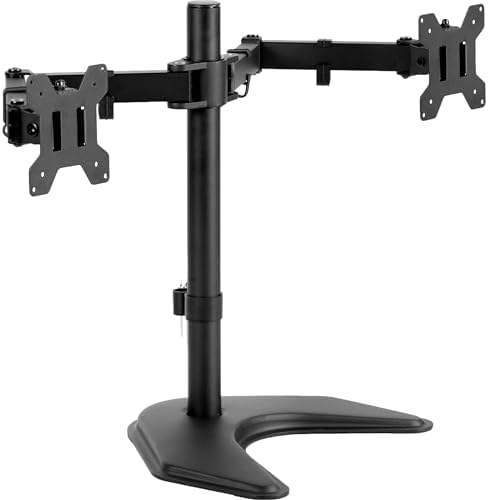


Pick by Your Need
- Best overall: HUANUO FlowLift Dual Monitor Stand. It pairs a dual C-clamp and grommet base with a 4.4 to 19.8 lbs per-screen range for 13 to 32 inch monitors.
- Best for a desk you cannot clamp: VIVO Freestanding Dual Monitor Stand. Its 13 x 10.5 inch base sits on the desktop, so there is no clamp thickness range to measure.
- Best for taller positioning: ErGear Dual Monitor Arm. It adjusts up to 17.5 inches high and extends up to 18.1 inches, the longest reach figures in this group.
- Best for a 32 inch pair without a clamp: VIVO Dual Stand With Glass Base. It holds up to 22 lbs each across 13 to 32 inch screens on a 15.2 x 10.2 inch tempered glass base.
- Best for two matched lighter screens: MOUNT PRO Free-Standing Dual Monitor Stand. Each arm holds up to 17.6 lbs, and the listing notes it works better with two monitors of the same weight.
Quick Answer
For most wooden desks that fall inside the stated thickness range, the HUANUO FlowLift covers the widest combination of screen size, mounting options, and per-arm weight range. If clamping is not possible, the VIVO glass base model is the freestanding option that still reaches 32 inch screens at up to 22 lbs each. The ErGear arm suits readers who need the extra height and extension, provided its narrower clamp range fits their desk.
Comparison Table
| Product | Mount type | Screen size | Weight limit from listing | Key dimension | Buy |
|---|---|---|---|---|---|
| HUANUO FlowLift | C-clamp and grommet | 13 to 32 inches | 4.4 to 19.8 lbs per arm | Raises up to 15.75 inches | View on Amazon |
| VIVO Freestanding STAND-V002F | Freestanding base | 13 to 27 inches | Up to 22 lbs | Base 13 x 10.5 inches | View on Amazon |
| ErGear Dual Monitor Arm | C-clamp and grommet | 13 to 32 inches | 4.84 to 19.8 lbs | Height up to 17.5 inches, extension up to 18.1 inches | View on Amazon |
| VIVO Glass Base STAND-V002FG | Freestanding glass base | 13 to 32 inches | 22 lbs each | Glass base 15.2 x 10.2 inches | View on Amazon |
| MOUNT PRO Free-Standing | Freestanding V-shaped base | 13 to 27 inches | 17.6 lbs per arm | Height up to 17.6 inches | View on Amazon |
Read the weight column carefully, because the five listings do not frame their limits the same way. HUANUO and ErGear both give a range with a minimum as well as a maximum, which means a very light screen can fall below the stated range just as a heavy one can exceed it. The two VIVO models state 22 lbs figures, with the glass base version spelling out 22 lbs each, while MOUNT PRO sets the lowest ceiling here at 17.6 lbs per arm.
Decision Guide
Start with screen size, since it removes options fastest. If either of your monitors is larger than 27 inches, the VIVO STAND-V002F and the MOUNT PRO stand are out, because both listings cap screen size at 27 inches. That leaves the HUANUO, the ErGear, and the VIVO glass base model, each of which covers 13 to 32 inches. If both screens are 27 inches or smaller, all five remain in play and the decision shifts to mounting style and weight.
Next, decide between clamping and freestanding. The HUANUO clamps or bolts through a grommet on desks from 0.59 to 3.54 inches thick, and its listing recommends wooden desks only, ruling out plastic or glass desks and desks with cross beams or panels under the mounting point. The ErGear uses a one-piece C-clamp for desks 0.39 to 2.56 inches thick or a bolt-through grommet mount for desks 0.39 to 2.95 inches thick, and it also points readers toward wooden desks with no crossbeam blocking the underside. Measure your desktop thickness at the exact spot where the clamp would sit, including any edge trim, before treating either model as a fit.
Freestanding models trade that measuring step for desk footprint. The VIVO STAND-V002F base measures 13 x 10.5 inches, the VIVO glass base measures 15.2 x 10.2 inches, and MOUNT PRO uses a V-shaped base whose listing gives overall stand dimensions of 17.6 x 12.01 x 4.33 inches. Lay a tape measure or a sheet of paper of the same size where the base would sit and check that your keyboard position still works, because the base occupies the strip of desk directly in front of the screens.
Then weigh each monitor without its factory stand if you can, or find the panel weight in your monitor manual, and compare it against the per-arm figures where the listing gives them. A pair at 18 lbs each fits the HUANUO range of 4.4 to 19.8 lbs, the ErGear range of 4.84 to 19.8 lbs, and the VIVO glass base limit of 22 lbs each, but it exceeds the MOUNT PRO limit of 17.6 lbs per arm. For the VIVO STAND-V002F, the listing states only up to 22 lbs, without saying whether that figure is per screen or for the pair in total, so a pair at 18 lbs each cannot be confirmed as a fit from that figure alone — check the product page before relying on it. A pair at 21 lbs each fits only the VIVO glass base model on a clearly stated per-screen basis. A very light pair under 4.4 lbs each falls below the minimum for both clamp arms, which is a detail that is easy to miss when shoppers check only the maximum.
Finally, think about how you actually move your screens. If you rotate one monitor to portrait for documents or code, check the rotation figure: all five listings include 360 degree rotation, so orientation alone does not separate them. Tilt and swivel ranges do differ slightly. The HUANUO offers +85/-50 degree tilt and ±90 degree swivel, the ErGear offers +80/-50 degree tilt and ±90 degree swivel, the VIVO STAND-V002F offers +90 to -90 degree tilt and 180 degree swivel, the VIVO glass base model offers +90 to -90 degree tilt and 360 degree swivel, and MOUNT PRO offers -90 to +90 degree tilt and -90 to +90 degree swivel. Height is the clearer separator: 15.75 inches of raise on the HUANUO, up to 17.5 inches on the ErGear, up to 17.6 inches on MOUNT PRO, and height adjustment along a center pole on both VIVO models, with no numeric height given for those two.
1. HUANUO FlowLift Dual Monitor Stand — Best Overall
The HUANUO FlowLift is the only model here built around a dual C-clamp structure with a larger platform, and it also includes a grommet mounting option for desks 0.59 to 3.54 inches thick. It covers 13 to 32 inch screens at 4.4 to 19.8 lbs each with 75x75mm or 100x100mm VESA holes, raises a screen up to 15.75 inches, and routes cables along the arms with built-in cable management. Its angle set of +85/-50 degree tilt, ±90 degree swivel, and 360 degree rotation matches the portrait and landscape switching most two-screen desks need.
| Spec | From the listing |
|---|---|
| Screen size | 13 to 32 inches |
| Weight range per arm | 4.4 to 19.8 lbs |
| VESA pattern | 75x75mm or 100x100mm |
| Desk thickness | 0.59 to 3.54 inches |
| Tilt and swivel | +85/-50 degree tilt, ±90 degree swivel, 360 degree rotation |
| Color | Black |
2. VIVO Freestanding Dual Monitor Stand — Best for Desks That Cannot Take a Clamp
This VIVO stand, model STAND-V002F, skips clamping entirely and rests on a 13 x 10.5 inch base with padding on the bottom to protect the desk surface. It fits 13 to 27 inch screens at up to 22 lbs with 75x75mm or 100x100mm mounting holes, and height is set by sliding the arms along the center pole rather than by a counterbalanced arm. Detachable VESA bracket plates and detachable cable clips on the arms and center pole round out a setup aimed at desks where a clamp cannot go, such as glass tops that the clamp models rule out.
| Spec | From the listing |
|---|---|
| Screen size | 13 to 27 inches |
| Weight limit | Up to 22 lbs |
| VESA pattern | 75x75mm or 100x100mm |
| Base size | 13 x 10.5 inches |
| Tilt and swivel | +90 to -90 degree tilt, 180 degree swivel, 360 degree rotation |
| Product weight | 4.48 pounds |
3. ErGear Dual Monitor Arm — Best for Height and Reach
The ErGear arm reaches further than the other clamp model, with height adjustment up to 17.5 inches and extension up to 18.1 inches, compared with the HUANUO raise of up to 15.75 inches. It fits 13 to 32 inch flat or curved monitors from 4.84 to 19.8 lbs on 75x75mm or 100x100mm VESA patterns, and its VESA plate is described as tool-free, with cable clips that open without tools as well. The listing also gives a cycle figure for the core, stated as over 20,000 cycles, which none of the other four listings provide.
| Spec | From the listing |
|---|---|
| Screen size | 13 to 32 inches, flat or curved |
| Weight range | 4.84 to 19.8 lbs |
| VESA pattern | 75x75mm or 100x100mm |
| Desk thickness | 0.39 to 2.56 inches by C-clamp, 0.39 to 2.95 inches by grommet |
| Tilt and swivel | +80/-50 degree tilt, ±90 degree swivel, 360 degree rotation |
| Color | Black |
4. VIVO Dual Stand With Glass Base — Best Freestanding Pick for Larger Screen
The second VIVO model, STAND-V002FG, is the only freestanding stand here that reaches 32 inch screens, and it states the highest clearly stated per-screen capacity at 22 lbs each. Its rectangular tempered glass base measures 15.2 x 10.2 inches with bottom-side padding, while the pole and arms are steel, a materials split none of the other listings describe in the same way. Arms adjust along the center pole with +90 to -90 degree tilt, 360 degree swivel, and 360 degree rotation, and removable VESA plates are included for mounting. Skip it if your desk cannot spare a 15.2 inch wide footprint in front of the screens, because that glass base is the widest base dimension in this group.
| Spec | From the listing |
|---|---|
| Screen size | 13 to 32 inches |
| Weight limit | 22 lbs each |
| VESA pattern | 75x75mm or 100x100mm |
| Base | Tempered glass, 15.2 x 10.2 inches |
| Tilt and swivel | +90 to -90 degree tilt, 360 degree swivel, 360 degree rotation |
| Package dimensions | The listing does not state it |
5. MOUNT PRO Free-Standing Dual Monitor Stand — Best for Matched Mid-Weight Pairs
MOUNT PRO takes a different base approach with a V-shaped base that includes a groove sized for a mobile phone, a small extra none of the other four listings mention. The stand fits 13 to 27 inch monitors at up to 17.6 lbs per arm on 75x75mm or 100x100mm VESA holes, adjusts up to 17.6 inches high, and offers -90 to +90 degree tilt, -90 to +90 degree swivel, and 360 degree rotation. At 8.49 pounds, it is the heaviest stand by listed product weight in this group, nearly double the 4.48 pounds given for the VIVO STAND-V002F.
| Spec | From the listing |
|---|---|
| Screen size | 13 to 27 inches |
| Weight limit per arm | Up to 17.6 lbs |
| VESA pattern | 75x75mm or 100x100mm |
| Height adjustment | Up to 17.6 inches |
| Tilt and swivel | -90 to +90 degree tilt, -90 to +90 degree swivel, 360 degree rotation |
| Product weight | 8.49 pounds |
Buying Checklist
- Measure each screen diagonally and check that both fall inside the size range of the stand you are considering, whether that is 13 to 27 inches or 13 to 32 inches.
- Weigh each monitor or find its panel weight, then check it against the per-arm figure, including the minimum weight on the HUANUO and ErGear ranges.
- Check the back of each monitor for 75x75mm or 100x100mm VESA holes, since all five stands require one of those two patterns.
- For a clamp model, measure your desk thickness at the mounting point and check for cross beams or panels underneath that would block the clamp.
- For a freestanding model, measure the base footprint against your available desk space, from 13 x 10.5 inches up to 15.2 x 10.2 inches.
- Compare your two or three finalists side by side on height range and tilt range, and check the return window on the product page before ordering.
FAQ
Do all five stands fit the same VESA patterns?
Yes, on the figures given. Every listing here covers both 75x75mm and 100x100mm mounting holes, so the deciding checks are screen size and weight rather than the hole pattern. If your monitor has neither pattern, none of these five stands will mount it as described.
How do I choose between a clamp mount and a freestanding stand?
Choose a clamp or grommet model if your desk material and thickness fall inside the stated ranges and you want the desktop under the screens left clear. Choose a freestanding model if your desk is glass, too thick for the clamp ranges, or has a cross beam in the way, and you have the base footprint to spare. Either way, measure first, because both styles fail on dimensions rather than on features.
What if my two monitors have different weights?
Check each screen against the per-arm limit for its own side, not against a combined total. MOUNT PRO states directly that its stand works better with two monitors of the same weight, so an uneven pair is a reason to look at the other four. The HUANUO and ErGear ranges also set minimum weights of 4.4 lbs and 4.84 lbs, so a very light second screen needs checking as well.
Final Verdict
For a wooden desk inside the stated thickness range, the HUANUO FlowLift is the most complete package here, combining two mounting methods, the full 13 to 32 inch size range, and a clearly stated weight window per arm. Readers who need more height and reach should look at the ErGear arm, accepting its narrower clamp range in exchange for 17.5 inches of height and 18.1 inches of extension. If clamping is off the table, the VIVO glass base model carries larger and heavier screens, while the VIVO STAND-V002F and MOUNT PRO suit 27 inch pairs where their smaller ceilings still fit. Measure screen size, panel weight, and desk thickness or base space first, and the correct pick from these five usually becomes obvious.
Prime covers fast, free delivery on eligible items. See whether a Prime free trial is available for your account.
Check Prime on Amazon →Types of Monitor Arms and Stands
Monitor arms and stands are grouped mainly by mounting method and by how many screens they support.
Single-monitor arms hold one screen and usually mount via a desk clamp or grommet hole. Dual/multi-monitor arms support two or more screens on one base, either side by side or stacked. Gas-spring arms use a counterbalanced spring to let the screen move and hold any position with light touch; friction arms use simple tension instead, which is less smooth but usually cheaper. Fixed desktop stands skip the articulating arm for a simpler riser that just adds height.
Check the arm's weight range and the monitor's VESA mount pattern (the screw-hole spacing on the back) before buying, since not every monitor uses the same VESA size and an arm rated for a lighter screen can sag or fail under a heavier one.
Frequently Asked Questions
What's a gas-spring monitor arm?
It uses a counterbalanced spring mechanism so the screen can be repositioned with light touch and holds any position on its own, unlike a simple friction arm.
Do all monitors fit a monitor arm?
Only if the monitor's VESA mount pattern (the screw-hole spacing on the back) matches what the arm supports — not every monitor uses the same VESA size.
What's the difference between a monitor arm and a monitor stand?
An arm articulates (moves up/down/side to side) from a clamp or grommet mount; a stand is a simpler fixed-height riser the monitor sits on.
Related Guides
- Best Monitor Arm for a Standing Desk
- Best Single Monitor Stand for Small Desks
- Best Desk Setup Accessories for Two Monitors
- How to Measure Your Monitor for a VESA Mount




Write Your Review
No reviews yet. Be the first to share your experience!