
For most desks, start with the GFAZXDS steel arm or the Ergotron LX: both state the joint-highest per-screen limit, 22 pounds each. Four of the five support that role through a stated build or a high stated capacity. The Ergotron HX is a partial match on that element: its listing gives no heavy-duty claim and its per-screen limit is the lowest stated here, so check the product page before relying on it for heavy screens.
One conflict needs care. The GFAZXDS product name gives up to 32 inches (product name), while its facts cap fit at 30 inches, so work to 30 inches and confirm on the product page. The two M10 arms state capacity on a different basis: 48 pounds total across up to three monitors, not per screen.
As an Amazon Associate, we earn from qualifying purchases.


Pick by Your Need
- Best for joint-highest per-screen capacity: GFAZXDS steel arm. 22 pounds stated per monitor, tied with the LX.
- Best for a combined heavy load: Humanscale M10, polished aluminum. 48 pounds stated total across up to three monitors.
- Best for tall vertical stacking: Ergotron LX. Its 23-inch pole stacks screens vertically.
- Best for a black finish: Humanscale M10, black. The 48-pound total in a black finish.
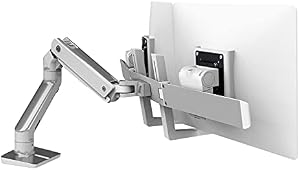
- Best for a hinged bow, with a flag: Ergotron HX. Its bow folds monitors outward; a partial match on heavy duty.
Quick Answer
Choose the GFAZXDS for a heavy-duty steel build and 22-pound per-screen limit, but note its size conflict: 32 inches in its product name (product name) against 30 in its facts. Choose the LX for 40 inches, the same limit and a stacking pole. Choose an M10 finish when a 48-pound combined total matters more than per-screen figures. The HX remains a partial match on heavy duty: its listing gives no heavy-duty claim, and its 5 to 17.5 pounds per screen is the lowest stated range here, so check the product page.
Comparison Table
| Product | Screen size | Stated capacity | VESA | Heavy-duty basis |
|---|---|---|---|---|
| GFAZXDS dual arm | 10 to 30 inches in facts; 32 in name (product name) | 22 pounds each | 75x75mm, 100x100mm | Heavy-duty steel stated |
| Humanscale M10, polished | not stated | 48 pounds total, three monitors | not stated | Heavier-equipment build stated |
| Ergotron LX stacking arm | Up to 40 inches | 7 to 22 pounds each | 75x75mm, 100x100mm | Heavy-duty clamp stated |
| Humanscale M10, black | not stated | 48 pounds total, three monitors | not stated | Heavier-equipment build stated |
| Ergotron HX dual arm | Up to 32 inches | 5 to 17.5 pounds each | 75x75mm, 100x100mm | Partial: heavy-duty claim missing from listing |
Decision Guide
Start with weight. Weigh each monitor without its stand and compare it with the per-screen limits — 22 pounds each for the GFAZXDS and the LX, 5 to 17.5 each for the HX, a partial match with no heavy-duty claim in its listing, so check the product page. The M10 listings state 48 pounds in total across up to three monitors instead, so add both screens before judging it; never read it as a per-screen limit.
Next, check VESA and size. The GFAZXDS and both Ergotron listings state VESA 75x75mm and 100x100mm, so measure bolt-hole spacing. The Humanscale listings leave VESA out and give no screen-size range. Where size is stated, the LX covers up to 40 inches, the HX up to 32, and the GFAZXDS facts cap fit at 30 inches despite the 32-inch figure in its product name (product name).
Then check the desk edge: the GFAZXDS clamp fits 20 to 100mm desk thickness, the LX clamp edges 0.63 to 2.6 inches thick, the HX clamp 0.6 to 2.6 inches, and both Ergotron models add a grommet mount. Units differ, so match your measured edge to the exact figure.
Finally, movement: the LX stacks screens vertically or side by side with 13 inches of lift; the HX folds monitors outward with 11.5 inches of lift; the GFAZXDS arms raise and lower 15.7 inches and rotate screens independently. The M10 listings emphasise spring and Smart Stop functionality, with lift figures missing from the listings.
1. GFAZXDS Dual Monitor Arm — Best for Joint-Highest Capacity
This dual arm is built from heavy-duty steel and states the joint-highest per-screen limit in the set, 22 pounds each. Its facts give a fit range of 10 to 30 inches, conflicting with the 32-inch figure in its product name (product name), so work to 30 inches and check the product page.
Pros
- Heavy-duty steel construction stated
- 22 pounds per monitor, tied for the highest stated per-screen limit
- Tilt, swivel and independent rotation stated
Cons
- Size figures conflict: 32 inches in its product name (product name) against a 30-inch cap in its facts
- Its product name says freestanding while its facts describe desk-clamp mounting — confirm the mount style on the product page
| Spec | From the listing |
|---|---|
| Screen fit | 10 to 30 inches in facts; 32 in name (product name) |
| Capacity | 22 pounds per monitor |
| VESA pattern | 75x75mm or 100x100mm |
| Movement | 85/15-degree tilt, 360-degree swivel, 15.7-inch lift |
2. Humanscale M10 Dual Arm, Polished Aluminum — Best for a Combined Heavy Load
The M10 is built to hold heavier equipment, its triple crossbar holding up to three monitors or 48 pounds in total. That total is a combined figure, not a per-screen limit, so it suits two heavier screens whose weights add up within it.
Pros
- 48-pound total capacity stated, the highest combined figure here
- Weight-Compensating Spring Technology and Smart Stop functionality stated
- Fits traditional and sit/stand desks per the listing
Cons
- Rival listings state VESA patterns of 75x75mm and 100x100mm; this listing gives none
- Capacity rests on a combined total, unlike the per-screen limits rivals state
| Spec | From the listing |
|---|---|
| Capacity | 48 pounds total, up to three monitors |
| Clamp | Two-piece clamp mount |
| Color | Aluminum |
| VESA pattern | The listing does not state it |
3. Ergotron LX Vertical Stacking Dual Arm — Best for Tall Vertical Stacking
The LX pairs two arms on a 23-inch pole, so screens stack vertically or sit side by side. It fits two screens up to 40 inches, the widest stated size range here, at 7 to 22 pounds each. It includes a heavy-duty desk clamp, a grommet mount plate and 13 inches of lift.
Pros
- Screens up to 40 inches, the widest stated size range here
- 22 pounds per screen, tied for the highest stated per-screen limit
- Clamp and grommet mounts both included
Cons
- Its 7-pound floor leaves out lighter screens the HX range, starting at 5 pounds, covers
- White is its only spec-table color, while the M10 line lists two other finishes
| Spec | From the listing |
|---|---|
| Screen fit | Up to 40 inches |
| Capacity | 7 to 22 pounds each |
| VESA pattern | 75x75mm and 100x100mm |
| Color | White |
4. Humanscale M10 Dual Arm, Black — Best for a Black Finish
This black M10 repeats the polished version’s core listing: a triple crossbar built to hold heavier equipment, up to three monitors or 48 pounds in total, with the same Weight-Compensating Spring Technology and Smart Stop functionality. Treat the 48 pounds as a combined total for both screens.
Pros
- 48-pound total capacity stated, matching the highest combined figure here
- Black finish, unlike the polished aluminum twin
- Weight-Compensating Spring Technology and Smart Stop functionality stated
Cons
- Ergotron models state size limits of 32 and 40 inches; this listing gives no screen-size range
- Rivals state their VESA patterns; this listing gives none, adding a product-page check rivals avoid
| Spec | From the listing |
|---|---|
| Capacity | 48 pounds total, up to three monitors |
| Clamp | Two-piece clamp mount |
| Color | Black |
| VESA pattern | The listing does not state it |
5. Ergotron HX Dual Monitor Arm — Best for a Hinged Bow, Partial Heavy-Dut
The HX is a partial match on the heavy-duty element: its listing gives no heavy-duty claim, and its 5 to 17.5 pounds per screen is the lowest stated range here, so check the product page before pairing it with heavier monitors. It fits two screens up to 32 inches on a hinged bow for sharing. Its spec table lists a product weight of 1.98 pounds, far below the 19.0 and 25.0 pounds listed for the LX and M10 models — confirm that figure on the product page.
Pros
- Hinged bow folds monitors outward for sharing
- Per-screen range starts at 5 pounds, the lowest stated floor here
- Clamp and grommet mounts both included
Cons
- Its 17.5-pound per-screen cap is the lowest stated here, and its listing gives no heavy-duty claim
- Lift of 11.5 inches trails the 13 inches of lift the LX listing states
| Spec | From the listing |
|---|---|
| Screen fit | Up to 32 inches |
| Capacity | 5 to 17.5 pounds each |
| VESA pattern | 75x75mm and 100x100mm |
| Color | Polished Aluminum |
Shopping Checklist
- Measure first: weigh each monitor without its stand and measure its VESA spacing.
- Check stated dimensions and limits: match screen weights against per-screen limits, or a combined total where given.
- Check material and assembly: note the stated build material; check included hardware, tools and instructions.
- Check the return window on the product page, especially where a listing leaves figures out.
- Compare two or three finalists side by side: capacity basis, clamp range, lift.
- Do not buy a size you did not measure: desk-edge thickness decides clamp fit.
FAQ
How do I check whether a dual monitor arm fits my screens?
Weigh each monitor without its stand and measure its bolt-hole distance. Match the weight against the stated per-screen limit, or the combined total where used, and match bolt spacing against the stated VESA patterns. Where a listing leaves a figure out, as the Humanscale listings do for VESA, confirm it on the product page.
What should count as heavy duty in a dual monitor arm?
Look for a stated heavy-duty build — the GFAZXDS steel construction, the LX heavy-duty clamp — or a high stated capacity such as 22 pounds per screen. Treat an arm as a partial match when its listing gives no heavy-duty claim and a lower capacity, as with the HX at 5 to 17.5 pounds per screen here. Check which basis a capacity uses: per screen or combined total.
Should I choose a clamp mount or a grommet mount?
A clamp grips the desk edge and needs your desk thickness inside its clamp range. A grommet mount attaches through a desktop hole, suiting desks with a suitable hole or edges outside the clamp range. Both appear in the Ergotron listings; the others describe clamp mounting.
Final Verdict
The GFAZXDS and the LX lead on stated figures, each at 22 pounds per screen: pick the GFAZXDS for steel construction, working to its 30-inch fact figure rather than the 32 inches in its product name (product name), and the LX for 40-inch screens and stacking. The M10 finishes suit buyers who prefer a 48-pound combined total, accepting extra product-page checks for VESA and size. The HX is the partial match on heavy duty — no heavy-duty claim in its listing, the lowest stated per-screen range — so it fits lighter pairs and hinged-bow sharing rather than the heaviest loads.
Prime covers fast, free delivery on eligible items. See whether a Prime free trial is available for your account.
Check Prime on Amazon →Product and ASIN Reference
| Product | ASIN | Grade |
|---|---|---|
| GFAZXDS dual monitor arm | B0HRDMVRY9 | Match — heavy-duty steel, 22 pounds per screen; size conflict: 30 inches in facts, 32 in name (product name) |
| Humanscale M10, polished aluminum | B07XRP53M1 | Match — heavier-equipment build, 48 pounds total; VESA and size missing from listing |
| Ergotron LX vertical stacking arm | B07517VHG4 | Match — heavy-duty clamp, 22 pounds per screen |
| Humanscale M10, black | B07KKD37F5 | Match — heavier-equipment build, 48 pounds total; VESA and size missing from listing |
| Ergotron HX dual arm | B01N6H9UR2 | Partial match — heavy-duty claim missing from listing; lowest per-screen range; check product page |


Write Your Review
No reviews yet. Be the first to share your experience!