
Every hub in this set is built for the 24-inch iMac and states iMac compatibility in its listing, so the real contest is ports, speed and storage: three hubs state a 10Gbps top speed, two add HDMI, and four include an M.2 SSD slot. The silver GKEAPZA 8-in-1 is the most complete package on stated figures, pairing 10Gbps ports with 4K HDMI and an NVMe slot, while the GEWOKLIY is the lightest, simplest option.
One caution comes first: the GEWOKLIY carries a listing conflict — its product name lists M1, M3, M4 and M6 chip support, while its facts state the hub fits only the M1 and M3 24-inch iMac and that no other models can use it. Treat the narrower facts as the safer reading and check the product page against your chip.
As an Amazon Associate, we earn from qualifying purchases.
Pick by Your Need
- Best for a second screen: GKEAPZA 8-in-1 silver hub. It states 4K at 60Hz HDMI and 10Gbps ports.
- Best for flexible SSD choice: Minisopuru DS802. Its slot accepts NVMe or SATA drives, the widest stated support here.
- Best for the lightest setup: GEWOKLIY 7-in-1. It states the lowest weight in the set, 0.14 pounds.
- Best for the fullest USB layout: Inateck iMac dock. It enumerates three USB-A and two USB-C ports.
- Best for 2242-length SSDs: GKEAPZA 8-port green hub. Its slot lists 2242, 2260 and 2280 lengths.
Quick Answer
All five products match the keyword: each is a docking station or hub for the 24-inch iMac, with compatibility stated in its listing. The silver GKEAPZA 8-in-1 is the most complete all-round pick on stated figures, combining 10Gbps speed, 4K at 60Hz HDMI, SD and TF slots and an M.2 NVMe slot. The green GKEAPZA 8-port matches it with different SSD lengths, splitting the pair on drive size and finish.
Choose the Minisopuru DS802 for a SATA M.2 drive: it alone here accepts both NVMe and SATA. Choose the Inateck for the most enumerated USB ports and an SSD enclosure under the dock. Choose the GEWOKLIY only if your iMac carries an M1 or M3 chip and you accept its 5Gbps ceiling, because its facts restrict it to those two chips despite the wider list in its product name — verify that on the product page.
Comparison Table
| Product | Ports | Top stated speed | HDMI output | SSD expansion | Weight |
|---|---|---|---|---|---|
| GKEAPZA 8-in-1 (Silver) | 8-in-1 | 10Gbps | 4K at 60Hz | M.2 NVMe, up to 4TB | 0.61 pounds |
| Minisopuru DS802 | 7-in-1 | 10Gbps | not stated | M.2 NVMe or SATA, up to 4TB | not stated |
| GEWOKLIY 7-in-1 | 7-in-1 | 5Gbps | not stated | not stated | 0.14 pounds |
| Inateck iMac Dock | 3 USB-A, 2 USB-C, SD, micro SD | USB 3.2 Gen 2 | not stated | NVMe enclosure | 0.49 pounds |
| GKEAPZA 8-Port (Green) | 8 ports | 10Gbps | 4K at 60Hz | M.2 NVMe, up to 4TB | not stated |
Decision Guide
Start with your iMac’s chip: compatibility can rule a hub out entirely. The two GKEAPZA hubs and the Minisopuru state support for M1, M3, M4 and M6 machines; the Inateck states M1, M3 and M4 support. The GEWOKLIY is the exception: its facts limit it to the M1 and M3 iMac and conflict with the M4 and M6 chips in its product name. On an M4 or M6 machine, drop it unless the product page settles that conflict.
Next, decide whether a second screen matters. Only the two GKEAPZA hubs state HDMI, each rated at 4K at 60Hz; the other three listings give no HDMI output, so a dual-screen setup points straight at that pair.
Then weigh storage. Four hubs include an M.2 slot or enclosure for a drive you supply, three stating capacities up to 4TB; the Inateck mounts its enclosure under the dock. Format separates them: the Minisopuru accepts NVMe or SATA, the green GKEAPZA takes 2242, 2260 and 2280 lengths, and the silver GKEAPZA takes 2230, 2260 and 2280. The GEWOKLIY gives no SSD slot.
Finally, compare speed and size. Three hubs state a 10Gbps top speed, the GEWOKLIY states 5Gbps, and the Inateck states the USB 3.2 Gen 2 standard, describing its theoretical speed as two times that of USB 3.0 while giving no Gbps figure. Stated weights run from the GEWOKLIY’s 0.14 pounds to the silver GKEAPZA’s 0.61, with the Inateck at 0.49; the other two leave weight out.
1. GKEAPZA 8-in-1 USB-C Hub, Silver — Best all-round feature set

This 8-in-1 hub pairs a stated 10Gbps top speed with HDMI and an M.2 NVMe slot in a silver finish. Its listing states 4K at 60Hz HDMI, 10Gbps USB-C and USB-A 3.2 Gen 2 ports, SD and TF slots, and an SSD slot accepting 2230, 2260 and 2280 NVMe drives up to 4TB, drive sold separately. Stated compatibility covers the 24-inch iMac on M6, M4, M3 and M1.
Pros
- States 10Gbps USB-C and USB-A 3.2 Gen 2 speeds
- States 4K at 60Hz HDMI for a second screen
- NVMe slot accepts three drive lengths up to 4TB
Cons
- Heaviest stated weight in the set, 0.61 pounds against the GEWOKLIY’s 0.14
- Drive lengths start at 2230, so 2242 owners are served by the green GKEAPZA
| Spec | From the listing |
|---|---|
| Top transfer speed | 10Gbps |
| HDMI output | 4K at 60Hz |
| SSD slot | M.2 NVMe, 2230/2260/2280, up to 4TB |
| Weight | 0.61 pounds |
2. Minisopuru DS802 iMac Docking Station, Blue — Best for SATA or NVMe drives

The DS802 is a 7-in-1 dock for the 24-inch iMac whose standout stated trait is drive flexibility: its M.2 slot accepts NVMe or SATA SSDs up to 4TB, where rival slots state NVMe only. Its listing states a maximum 10Gbps speed through one USB-C 3.2 Gen 2 and one USB-A 3.2 port, plus two further USB-A ports and SD and TF access. Its product name lists M1 through M6 chips; the facts list M1, M3 and M4.
Pros
- Only listing here accepting both M.2 NVMe and SATA drives
- States a maximum 10Gbps transfer speed
- States SD and TF card access in seven ports
Cons
- The two GKEAPZA hubs add HDMI, which this dock’s listing leaves out
- Stated 5.91-inch length is the longest footprint in the set
| Spec | From the listing |
|---|---|
| Top transfer speed | 10Gbps |
| SSD support | M.2 NVMe or SATA, up to 4TB |
| Dimensions | 5.91 x 5.31 x 0.83 inches |
| Weight | The listing does not state it |
3. GEWOKLIY 7-in-1 USB C Hub — Best for the lightest setup

This 7-in-1 hub states the lowest weight in the set at 0.14 pounds and keeps its ports simple: two USB 3.0, two USB 2.0, one Type-C, and an SD and micro SD reader that can read both cards simultaneously. Its stated ceiling is 5Gbps, with USB 2.0 at 480Mbps. Buyers must weigh a real listing conflict: the product name lists M1, M3, M4 and M6 chips, while the facts state the hub fits only the M1 and M3 iMac and that no other models can use it — check the product page against your chip before ordering.
Pros
- Lightest stated weight in the set, 0.14 pounds
- States simultaneous SD and micro SD reading
- Four USB ports across USB 3.0 and USB 2.0
Cons
- Stated 5Gbps ceiling sits below three rivals’ 10Gbps
- Chip support conflicts within its own listing; the facts restrict it to M1 and M3
| Spec | From the listing |
|---|---|
| USB ports | 2 x USB 3.0, 2 x USB 2.0, 1 x Type-C |
| Top transfer speed | 5Gbps |
| Size | iMac 24-inch (M1/M3) |
| Weight | 0.14 pounds |
4. Inateck iMac Docking Station, Blue — Best for the fullest USB layout

The Inateck dock is the only listing here enumerating its full USB layout: three USB-A and two USB-C ports, plus SD and micro SD slots. It states the USB 3.2 Gen 2 standard and describes its theoretical transfer speed as two times that of USB 3.0, while giving no Gbps figure of its own. An NVMe enclosure sits at the dock’s bottom, the hub can recharge a phone and tablet per its listing, and stated support covers the 24-inch iMac on M1, M3 and M4.
Pros
- Fullest enumerated USB layout: three USB-A, two USB-C
- NVMe enclosure built into the dock’s bottom
- States phone and tablet recharging
Cons
- The two GKEAPZA hubs state HDMI, which this dock’s listing leaves out
- Speed arrives as a standard name, while three rivals state 10Gbps
| Spec | From the listing |
|---|---|
| Standard | USB 3.2 Gen 2 |
| Ports | 3 USB-A, 2 USB-C, SD slot, micro SD slot |
| SSD support | NVMe enclosure at the bottom of the dock |
| Weight | 0.49 pounds |
5. GKEAPZA 8-Port USB C Hub, Green — Best for 2242-length SSDs
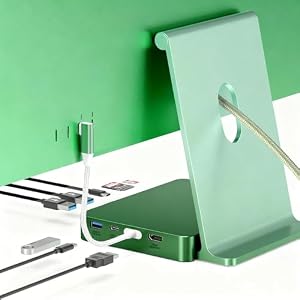
This green 8-port hub mirrors the silver GKEAPZA’s headline figures: 10Gbps top speed, 4K at 60Hz HDMI, SD and TF slots, and an M.2 NVMe slot rated up to 4TB, drive sold separately. The difference sits in the slot: 2242, 2260 and 2280 lengths, where the silver model takes 2230 instead of 2242. Stated design covers the 24-inch iMac on M1, M3, M4 and M6.
Pros
- States 10Gbps speeds and 4K at 60Hz HDMI
- NVMe slot accepts 2242, 2260 and 2280 lengths up to 4TB
- States SD and TF slots in eight ports
Cons
- Owners of 2230-length drives get slot support from the silver GKEAPZA instead
- Green is the only finish listed; rivals offer silver and blue
| Spec | From the listing |
|---|---|
| Top transfer speed | 10Gbps |
| HDMI output | 4K at 60Hz |
| SSD slot | M.2 NVMe, 2242/2260/2280, up to 4TB |
| Weight | The listing does not state it |
Shopping Checklist
- Match your iMac’s chip against each hub’s stated chip support on the product page.
- Check which SSD formats and lengths a slot accepts first.
- Check the return window on the product page before ordering.
- Do not buy a hub whose stated chip support you have not matched to your machine.
FAQ
Will any of these hubs work with an iMac that is not the 24-inch model?
Each listing here states design for the 24-inch iMac, and the GEWOKLIY facts state that no other models can use that hub. On a different iMac size, treat these five as unsuitable and check stated model support on the product page.
Do these hubs come with an SSD already fitted?
The listings cover drives you supply: the GKEAPZA hubs state the SSD is sold separately, and the Minisopuru states its SSD is not included. Plan on buying a compatible M.2 drive in the stated format and length.
How do I choose between a 10Gbps hub and a 5Gbps hub?
Rank by stated ceilings: three hubs state 10Gbps, the GEWOKLIY states 5Gbps, and the Inateck states the USB 3.2 Gen 2 standard without a Gbps figure.
Final Verdict
The silver GKEAPZA 8-in-1 is the default recommendation: it combines a 10Gbps top speed, 4K at 60Hz HDMI and an NVMe slot, and the green GKEAPZA matches it bar drive lengths and finish. Pick the Minisopuru DS802 for a SATA drive, the Inateck for five enumerated USB ports and an underside enclosure. The GEWOKLIY suits only M1 and M3 owners who value its 0.14-pound weight over speed, and its chip conflict makes the product page check matter most there: confirm the stated fit for your iMac before ordering.
Prime covers fast, free delivery on eligible items. See whether a Prime free trial is available for your account.
Check Prime on Amazon →Product and ASIN Reference
| Product | ASIN | Match |
|---|---|---|
| GKEAPZA 8-in-1 USB-C Hub, Silver | B0FMJC59YW | Match |
| Minisopuru DS802, Blue | B09XV9XGHZ | Match |
| GEWOKLIY 7-in-1 USB C Hub | B0BL2DKRC6 | Match |
| Inateck iMac Dock, Blue | B0CQ7QYGXP | Match |
| GKEAPZA 8-Port USB C Hub, Green | B0FZG6ZW5Y | Match |





Write Your Review
No reviews yet. Be the first to share your experience!