
A mini PC takes up little room on its own, and a VESA mount moves it off the desk entirely. The five mounts in this guide all hold a small computer behind a monitor, under a desk, or on a monitor pole, and all five fit Intel NUC models, Mac Mini, Chromebox, thin clients, and small CPUs. What separates them is the numbers: widths run 0.6 to 2.8 inches, limits run 11 to 12 pounds, and options run three methods to four. We compared the listing details for each bracket, so measure your device and match it to the bracket that covers its width, weight, and mounting spot.
As an Amazon Associate, we earn from qualifying purchases.


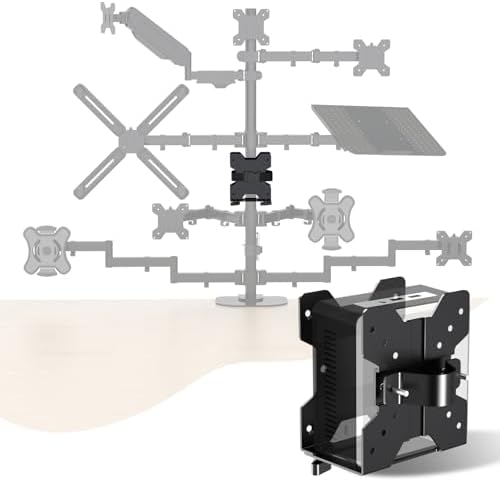
Pick by Your Need
- Best overall: Motiexic Adjustable Thin Client Mount. Widest top width at 2.8 inches, highest limit at 12 pounds, four options, pen holder.
- Best for pole mounting: VIVO Thin Client Mini PC Mount. Only one stating a pole clamp range, 3 cm to 4.1 cm.
- Best for VESA patterns: suptek Thin Client Mount Bracket. Names 75×75 and 100×100 mm VESA patterns, supports up to 11 pounds.
- Best for combined device and monitor load: HumanCentric Thin Client Mount Bracket. Supports up to 11 pounds, 18 pound combined device and monitor figure.
- Best lightest bracket: Pholiten Adjustable Thin Client Mount. Lightest listed bracket at 1.59 pounds, four mounting methods.
Quick Answer
The Motiexic is the pick for most setups because it covers widths from 0.63 to 2.8 inches, supports up to 12 pounds, and mounts on a wall, under a desk, behind a monitor, or on a monitor arm. If your device is a NUC, check that its power button sits on the side, since three listings name that as a condition for the fit.
Comparison Table
| Mount | Adjustable width | Weight limit | Mounting options |
|---|---|---|---|
| Motiexic | 0.63 to 2.8 in (1.6 to 7.0 cm) | Up to 12 lbs | Wall, under desk, behind monitor, monitor arm |
| VIVO | 1.8 to 7.1 cm | Up to 5 kg | Back of monitor, monitor pole, under desk |
| suptek | 0.6 to 2.7 in | Up to 11 lbs | Back of monitor, monitor pole, under desk |
| HumanCentric | 0.65 to 2.55 in | Up to 11 lbs | Under desk, behind monitor, to a pole |
| Pholiten | not stated | not stated | Under table, behind monitor, pole, wall |
Decision Guide
Start with the width of your device, because every bracket here is an adjustable clamp. The Motiexic covers 0.63 to 2.8 inches, the VIVO covers 1.8 to 7.1 cm, the suptek covers 0.6 to 2.7 inches, and the HumanCentric covers 0.65 to 2.55 inches. The suptek starts the lowest at 0.6 inches, while the Motiexic and the VIVO reach the widest top end at 2.8 inches. The Pholiten gives no width range in the listing.
Next, check the weight. The Motiexic supports up to 12 pounds, the highest limit stated among the five. The VIVO supports up to 5 kg, stated as 11 pounds in the title, and the suptek and the HumanCentric each support 11 pounds. The Pholiten gives no weight limit in the listing. Most mini PCs, NUC units, and thin clients weigh far less than 11 pounds, so the limit rarely decides the pick. The HumanCentric also gives an 18 pound figure for the combined device and monitor weight.
Then choose the mounting spot. All five mount behind a monitor and under a desk. The Motiexic and the Pholiten each offer four methods, adding a wall mount, while the other three offer three. The VIVO is the only one that states the pole size its clamp accepts, 3 cm to 4.1 cm in diameter.
Three listings name 75×75 mm and 100×100 mm VESA patterns: the suptek, the HumanCentric, and the Pholiten, while the Motiexic and the VIVO do not. The VIVO, the suptek, and the Pholiten each use an open frame design, and the suptek and the Pholiten state that it lets air pass through the device and gives unrestricted access to the ports. Three listings state that a NUC fits only when its power button is on the side of the device: the VIVO, the suptek, and the HumanCentric.
1. Motiexic Adjustable Thin Client Mount — Best overall
The Motiexic stands apart on the two numbers that matter most: its width range runs from 0.63 to 2.8 inches, the widest top end of the five, and its weight limit of 12 pounds is the highest stated limit in the group. It also offers four mounting options, wall, under desk, behind monitor, and monitor arm, plus a pen holder that none of the other four lists.
Pros
- Widest top width at 2.8 inches, tied with the VIVO
- Highest stated weight limit at up to 12 pounds
- Four mounting options, including a wall mount
Cons
- No VESA pattern named, so a 75×75 or 100×100 fit cannot be confirmed
- No bracket weight stated, so its own weight cannot be compared
| Spec | From the listing |
|---|---|
| ASIN | B0DB5RQH7V |
| Brand | Motiexic |
| Color | Black |
| Adjustable width | 0.63 to 2.8 in (1.6 to 7.0 cm) |
| Weight limit | Up to 12 lbs |
| Mounting options | Wall, under desk, behind monitor, attached to monitor arm |
2. VIVO Thin Client Mini PC Mount — Best for monitor poles
The VIVO is the only bracket of the five that states the pole size its clamp accepts, a diameter of 3 cm to 4.1 cm, which makes it the clear pick for a monitor pole setup. Its width adjusts from 1.8 to 7.1 cm, and its 5 kg limit, stated as 11 pounds in the title, matches the suptek and the HumanCentric. The bracket measures 4.8 by 0.7 by 5.0 inches, weighs 1.65 pounds, and is made of solid steel with a powder coated finish.
Pros
- Pole clamp diameter range of 3 cm to 4.1 cm
- Solid steel, powder coated finish, straps and rubber pads
- Hardware and instructions included for all three installation methods
Cons
- No VESA pattern named, so a 75×75 or 100×100 fit cannot be confirmed
- The NUC fit requires the power button on the side of the device
| Spec | From the listing |
|---|---|
| ASIN | B082FMHW2Q |
| Brand | VIVO |
| Color | Black |
| Adjustable width | 1.8 to 7.1 cm |
| Weight limit | Up to 5 kg (11 lbs in the title) |
| Mounting options | Back of monitor, monitor pole (3 to 4.1 cm diameter), under desk |
3. suptek Thin Client Mount Bracket — Best for VESA patterns
The suptek names both 75×75 mm and 100×100 mm VESA patterns, which the Motiexic and the VIVO do not, and it pairs that with an 11 pound weight limit and a width range of 0.6 to 2.7 inches. Its 0.6 inch starting width is the lowest of the five, so it covers the thinnest devices in the group. The bracket is made of solid steel with a rust-proof coating, and its open frame design lets air pass through the device and gives unrestricted access to the ports.
Pros
- Names both 75×75 mm and 100×100 mm VESA patterns
- Lowest starting width at 0.6 inches
- Open frame design for airflow and port access
Cons
- The 2.7 inch top width is the second-narrowest maximum width among the five
- The NUC fit requires the power button on the side of the device
| Spec | From the listing |
|---|---|
| ASIN | B0B2PTMHDD |
| Brand | suptek |
| Color | Black |
| Adjustable width | 0.6 to 2.7 in |
| Weight limit | Up to 11 lbs |
| VESA patterns | 75×75 and 100×100 mm |
4. HumanCentric Thin Client Mount Bracket — Best for combined device and monitor loa
The HumanCentric fits devices from 0.65 to 2.55 inches in depth, the narrowest range of the five, and it supports devices up to 11 pounds. What sets it apart is the second weight figure in the listing: the bracket supports up to 18 pounds for the combined weight of the device and the monitor, which matters for a monitor arm setup where the bracket and the screen share one arm. It names 75×75 and 100×100 mm VESA patterns and mounts under a desk, behind a monitor, or to a pole.
Pros
- 18 pound combined device and monitor weight figure
- Names both 75×75 mm and 100×100 mm VESA patterns
- Hardware for all three methods, silicone strips, step-by-step manual
Cons
- The 0.65 to 2.55 inch range is the narrowest of the five
- The NUC fit requires the power button on the side of the device
| Spec | From the listing |
|---|---|
| ASIN | B07KY3LHVG |
| Brand | HumanCentric |
| Color | Black |
| Depth range | 0.65 to 2.55 in |
| Weight limit | Up to 11 lbs (18 lbs device + monitor combined) |
| Mounting options | Under desk, behind monitor, to a pole |
5. Pholiten Adjustable Thin Client Mount — Best lightest bracket
The Pholiten offers four mounting methods, under the table, behind the monitor, connected to the pole, or mounted on the wall, which matches the Motiexic and beats the three-method brackets. Its listed bracket weight of 1.59 pounds is the lightest of the five, against 1.65 pounds for the VIVO and the HumanCentric. It names 75×75 mm and 100×100 mm VESA patterns and uses an open frame design.
Pros
- Four mounting methods, including a wall mount
- Lightest listed bracket weight at 1.59 pounds
- Open frame design, 75×75 and 100×100 mm VESA patterns
Cons
- No width range given, so the fit cannot be checked from the listing numbers
- No weight limit given, so the supported weight cannot be compared
| Spec | From the listing |
|---|---|
| ASIN | B0BYCWJ8VN |
| Brand | Pholiten |
| Color | Black |
| Adjustable width | The listing does not state it |
| Weight limit | The listing does not state it |
| Mounting options | Under table, behind monitor, connected to pole, mounted on wall |
| VESA patterns | 75×75 and 100×100 mm |
Buying Checklist
- Measure the device thickness and compare it with the bracket’s stated width range
- Check the device weight against the stated limit: 12 pounds for the Motiexic, 11 for the VIVO, suptek, and HumanCentric; the Pholiten states no limit
- Confirm the mounting spot and measure the pole diameter if the VIVO is the pick
- Confirm the VESA pattern, 75×75 or 100×100 mm, if the mount goes behind a monitor
- Check that a NUC power button sits on the side of the device for the VIVO, suptek, and HumanCentric
- Check the product page for the Pholiten width range and weight limit
FAQ
How do I know if a VESA mount fits my mini PC?
Measure the thickness of the device and compare it with the bracket’s stated adjustable width range. The Motiexic covers 0.63 to 2.8 inches, the VIVO covers 1.8 to 7.1 cm, the suptek covers 0.6 to 2.7 inches, and the HumanCentric covers 0.65 to 2.55 inches. The Pholiten gives no width range, so check the product page before ordering.
Which mounting spot works best for a mini PC?
Behind the monitor keeps the device hidden and the cables short, under the desk frees the whole desktop, a monitor pole works when the desk has no free surface, and a wall mount suits a fixed workstation. The Motiexic and the Pholiten offer all four methods, while the other three offer three.
Does the weight limit matter for a mini PC?
Most mini PCs, NUC units, and thin clients weigh far less than the stated limits. The Motiexic supports up to 12 pounds, the VIVO supports up to 5 kg, and the suptek and the HumanCentric support up to 11 pounds. The limit matters more for a heavier small CPU or docking station, and the HumanCentric also gives an 18 pound combined figure.
Final Verdict
The Motiexic is the pick for most buyers because it covers the widest top width at 2.8 inches, carries the highest stated weight limit at 12 pounds, and offers four mounting options. The VIVO is the pick for a monitor pole, since it is the only one that states the pole diameter range of 3 cm to 4.1 cm. The suptek suits a buyer who wants confirmed 75×75 and 100×100 mm VESA patterns with the lowest starting width of 0.6 inches. The HumanCentric suits a monitor arm setup because of its 18 pound combined figure. The Pholiten suits a buyer who wants four mounting methods with the lightest listed bracket at 1.59 pounds, once the width range and weight limit are confirmed.
Prime covers fast, free delivery on eligible items. See whether a Prime free trial is available for your account.
Check Prime on Amazon →Types of Mini PCs
Mini PCs are grouped mainly by how much power they draw and how much they can be upgraded later.
Low-power/office mini PCs (often Intel N-series chips) handle browsing, office work, and media playback with minimal heat or fan noise. Mini PCs with discrete-capable graphics add enough GPU headroom for light gaming or creative work, though not full desktop-tower performance. Fanless mini PCs rely on a passive heatsink case for silent, dust-free operation at the cost of some sustained performance. Barebone kits ship without RAM, storage, or an OS installed, letting the buyer choose and install those parts.
Check whether RAM and storage are soldered or in upgradeable SO-DIMM/M.2 slots before buying if you expect to add capacity later, since this varies a lot between models even at similar price points.
Frequently Asked Questions
What's the difference between a mini PC and a NUC?
NUC (Next Unit of Computing) is Intel's own small-form-factor design; "mini PC" is the broader category that includes NUCs alongside similar compact PCs from other brands.
Can a mini PC be used for gaming?
Only models with a discrete-capable GPU handle gaming well; most mini PCs use integrated graphics suited to light or older games rather than demanding modern titles.
Do mini PCs support RAM and storage upgrades?
It depends on the model — some use upgradeable SO-DIMM RAM and M.2 storage slots, while others solder components in place, so checking the specific model matters before assuming it can be upgraded later.
Related Guides
Related guides for this topic are not listed here.
Write Your Review
No reviews yet. Be the first to share your experience!