
The DAYJOY frame for the SanDisk Extreme Portable SDSSDE30 is the strongest silicone bumper external ssd pick in this set, cut for one named drive family across 4 capacities, with a bottom cutout that keeps the port open. One point applies to all five: every one is a bumper or sleeve only, and none includes the SSD itself.
Two of the five are partial matches: the FUNOMOCYA sleeve is a bulk pack of 4 pieces rather than a single fitted bumper, and the JOINPAYA cover’s facts describe a silicone sleeve, with the bumper wording from the product name only (product name). The other three are single bumpers molded for one specific drive each.
As an Amazon Associate, we earn from qualifying purchases.



Pick by Your Need
- Best for SanDisk Extreme Portable: DAYJOY frame. The only bumper here cut for the SDSSDE30, covering 500GB, 1TB, 2TB and 4TB.
- Best for WD My Passport SSD: FATBEAR bumper by Oidealo. Hollow frame sized for a drive of 3.94 x 2.17 x 0.35 inches.
- Best multi-pack: FUNOMOCYA sleeves, partial match as a bulk pack of 4 for standard 2.5 inch SSD and HDD enclosures.
- Best for M.2 NVMe enclosures: JOINPAYA sleeve, partial match (product name) for the bumper wording. At 0.02 pounds, the lighter of the two sleeves with a stated weight.
- Best for WD Black P40: FATBEAR backless bumper by Oidealo. Open frame built around the P40 shell at 4.21 x 2 x 0.51 inches.
Quick Answer
For a SanDisk Extreme Portable SDSSDE30 or a WD portable SSD, choose the bumper molded for that model: DAYJOY for SanDisk, FATBEAR for the My Passport or Black P40. The FUNOMOCYA 4-pack (partial match, bulk pack) suits generic 2.5 inch enclosures, and the JOINPAYA sleeve (partial match, bumper wording from the product name) fits M.2 NVMe enclosures. None of the five includes a drive.
Comparison Table
| Product | Made for | Pieces | Sleeve length | Weight |
|---|---|---|---|---|
| DAYJOY frame | SanDisk Extreme Portable SDSSDE30 | 1 | not stated | not stated |
| FATBEAR bumper (Oidealo) | WD My Passport Portable SSD | 1 | not stated | not stated |
| FUNOMOCYA sleeve (partial match, 4-pack) | 2.5 inch SSD and HDD enclosures | 4 | 4.49 in | 0.22 lb |
| JOINPAYA sleeve (partial match, product name) | M.2 NVMe enclosures | 1 | 4.13 in | 0.02 lb |
| FATBEAR backless bumper (Oidealo) | WD Black P40 Game Drive SSD | 1 | 4.61 in | not stated |
Decision Guide
Start with the drive you already own, because three of these bumpers fit exactly one model each. For a SanDisk Extreme Portable SDSSDE30 in 500GB, 1TB, 2TB or 4TB, the DAYJOY frame is the only option here cut for it. If your drive is a WD My Passport Portable SSD measuring 3.94 x 2.17 x 0.35 inches, choose the FATBEAR bumper with the hollow frame. If your drive is a WD Black P40 measuring 4.21 x 2 x 0.51 inches, choose the FATBEAR backless bumper instead, since the two FATBEAR frames are not interchangeable.
For a generic enclosure rather than a named retail model, the choice narrows to the two partial matches. The FUNOMOCYA pack (partial match, bulk pack of 4) fits standard 2.5 inch enclosures at 4.49 x 3.39 x 0.51 inches, suiting SATA drives and spare enclosures. The JOINPAYA sleeve (partial match, bumper wording from the product name) is a slimmer 4.13 x 1.18 x 0.47 inches, shaped for M.2 NVMe enclosures. Measure your enclosure first, because neither listing promises a fit beyond the stated dimensions.
1. DAYJOY Silicone Bumper Frame for SanDisk Extreme — Best for SanDisk Extreme Portable
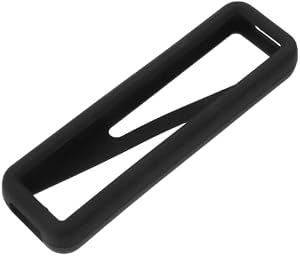
The DAYJOY frame is a soft silicone bumper for one drive family only: the SanDisk Extreme Portable new generation SDSSDE30 in 500GB, 1TB, 2TB and 4TB. A bottom cutout lets you plug in the SSD without removing the frame. The trade-off is scope: the listing names no other drive, gives no dimensions and states no weight, so this is a single-purpose purchase.
Pros
- Cut for the SDSSDE30 across all 4 capacities, 500GB to 4TB
- Bottom cutout allows cable access with the case left on the drive
- Soft silicone stated as scratch proof, shock proof and antiskidding
Cons
- Fits only the one named SanDisk model, while each FATBEAR frame covers 3 WD capacities with stated dimensions
- Dimensions and weight are missing, so its bulk cannot be compared with the 0.51 inch FUNOMOCYA sleeve
| Spec | From the listing |
|---|---|
| Compatible model | SanDisk Extreme Portable SDSSDE30 |
| Capacities covered | 500GB, 1TB, 2TB, 4TB |
| Material | Soft silicone |
| Port access | Bottom cutout, case stays on |
| Dimensions | The listing does not state it |
| Color | BLACK |
2. FATBEAR Silicone Bumper for WD My Passport SSD — Best for WD My Passport SSD
This FATBEAR bumper from Oidealo is engineered for the WD My Passport Portable SSD in 500G, 1TB and 2TB, sized to a drive of 3.94 x 2.17 x 0.35 inches. Its hollow frame leaves more drive shell exposed to air than the closed FUNOMOCYA sleeve. The trade-off is coverage: the open design favors airflow, and the listing states no bumper dimensions or weight of its own.
Pros
- Snug fit stated for one drive measuring 3.94 x 2.17 x 0.35 inches
- Hollow frame design aimed at air circulation during long transfers
- Thickened silicone with buffered corners and raised rims
Cons
- Hollow frame leaves more shell exposed than the closed 4.49 inch FUNOMOCYA sleeve
- Bumper dimensions and weight are missing, unlike the JOINPAYA sleeve at a stated 0.02 pounds
| Spec | From the listing |
|---|---|
| Compatible model | WD My Passport Portable SSD |
| Drive dimensions | 3.94 x 2.17 x 0.35 inches |
| Capacities covered | 500G, 1TB, 2TB |
| Material | Thickened silicone |
| Frame design | Hollow, heat dissipation |
| Color | Black |
3. FUNOMOCYA Silicone Sleeves for 2.5 Inch Drives — Best Multi-Pack for 2.5 Inch Drives
The FUNOMOCYA option is a partial match: a bulk pack of 4 silicone sleeves for standard 2.5 inch SSD and HDD enclosures, not one bumper molded to a named drive. Each sleeve measures 4.49 x 3.39 x 0.51 inches, the pack weighs 0.22 pounds, and the surface is textured with a connector opening. The trade-off: you give up model-specific fit, and in return one purchase covers up to 4 enclosures.
Pros
- 4 sleeves in one pack, the highest piece count of these five
- Stated size of 4.49 x 3.39 x 0.51 inches fits standard 2.5 inch enclosures
- Textured surface with a connector opening
Cons
- Generic enclosure fit rather than a molded fit for a named drive like the SDSSDE30
- A closed sleeve at 0.51 inches thick, lacking the open airflow design of the 2 FATBEAR frames
| Spec | From the listing |
|---|---|
| Pieces in pack | 4 |
| Fits | 2.5 inch SSD and HDD enclosures |
| Size | 4.49 x 3.39 x 0.51 inches |
| Weight | 0.22 pounds |
| Surface | Textured, anti-slip |
| Color | Assorted Color |
4. JOINPAYA Silicone Sleeve for NVMe Enclosures — Best for M.2 NVMe Enclosures
The JOINPAYA cover is a partial match: its listing facts describe a silicone sleeve for M.2 SSD and NVMe enclosures, and the bumper wording appears in the product name only (product name). At 4.13 x 1.18 x 0.47 inches it is the smallest cover here, and at 0.02 pounds the lighter of the two products with a stated weight. The trade-off is width: 1.18 inches suits slim NVMe enclosures, not a 2.5 inch enclosure like the 3.39 inch wide FUNOMOCYA sleeve.
Pros
- Slimmest stated footprint of the five at 4.13 x 1.18 x 0.47 inches
- Lightest stated weight here at 0.02 pounds
- Matte anti-slip finish and dust resistance stated in the listing
Cons
- The 1.18 inch width rules out 2.5 inch enclosures, which the FUNOMOCYA pack covers at 3.39 inches wide
- Bumper description rests on the product name, while the facts describe a sleeve (product name)
| Spec | From the listing |
|---|---|
| Fits | M.2 SSD, NVMe enclosures |
| Size | 4.13 x 1.18 x 0.47 inches |
| Weight | 0.02 pounds |
| Finish | Matte, anti-slip |
| Material | Silicone |
| Color | Black |
5. FATBEAR Backless Bumper for WD Black P40 — Best for WD Black P40
The second FATBEAR bumper from Oidealo is a backless, open-frame design for the WD Black P40 Game Drive SSD in 500G, 1TB and 2TB, around a drive of 4.21 x 2 x 0.51 inches. The bumper measures 4.61 x 2.4 x 0.91 inches, the longest of the three stated bumper lengths here. The trade-off is coverage: the open back leaves one face unprotected, where the closed FUNOMOCYA and JOINPAYA sleeves wrap fully.
Pros
- Molded for the P40 across 3 capacities, 500G, 1TB and 2TB
- Open frame stated to aid air circulation during long transfers
- Thickened silicone with buffered corners and raised rims
Cons
- Backless design leaves one face exposed, unlike the closed 0.47 inch JOINPAYA sleeve
- Weight is missing, so it cannot be weighed against the stated 0.02 pound JOINPAYA cover
| Spec | From the listing |
|---|---|
| Compatible model | WD Black P40 Game Drive SSD |
| Bumper dimensions | 4.61 x 2.4 x 0.91 inches |
| Drive dimensions | 4.21 x 2 x 0.51 inches |
| Capacities covered | 500G, 1TB, 2TB |
| Frame design | Backless, open frame |
| Color | Black |
Shopping Checklist
- Confirm your exact drive model first: 3 of these 5 bumpers fit one named drive each and nothing else.
- Remember that all 5 are bumpers or sleeves only; the SSD is never included.
- Measure a generic enclosure against 4.49 x 3.39 x 0.51 inches for the FUNOMOCYA pack (partial match, bulk pack) or 4.13 x 1.18 x 0.47 inches for the JOINPAYA sleeve (partial match, product name).
- Check port access: DAYJOY states a bottom cutout, and the 2 FATBEAR frames state precise cutouts.
- Decide between an open frame for airflow and a closed sleeve for full coverage before ordering.
FAQ
Does any of these bumpers include the SSD itself?
No. All five are bumpers or sleeves only, and the DAYJOY and FATBEAR listings state outright that the drive is not included. You need to own the matching SSD already, or buy it separately.
How do I know whether a fitted bumper matches my drive?
Match the model name and the drive dimensions in the listing. The FATBEAR My Passport bumper is sized for a drive of 3.94 x 2.17 x 0.35 inches, and the P40 bumper for one of 4.21 x 2 x 0.51 inches; if your drive differs, neither frame will seat.
Should I choose an open frame or a closed sleeve?
Choose an open or hollow frame, like the 2 FATBEAR bumpers, if your drive runs long transfers and airflow matters more than coverage. Choose a closed sleeve, like the FUNOMOCYA or JOINPAYA covers, if the drive travels loose in a bag.
Final Verdict
For a named drive, the fitted frames win: DAYJOY for the SanDisk Extreme Portable SDSSDE30, and FATBEAR for the WD My Passport SSD or the WD Black P40. For generic enclosures, the FUNOMOCYA 4-pack (partial match, bulk pack) covers 2.5 inch drives, and the JOINPAYA sleeve (partial match, bumper wording from the product name) covers slim NVMe enclosures at 0.02 pounds. Whichever you pick, confirm model and dimensions on the product page first, since all five are bumpers only and a wrong fit protects nothing.
Prime covers fast, free delivery on eligible items. See whether a Prime free trial is available for your account.
Check Prime on Amazon →Product and ASIN Reference
| Product | ASIN | Grade |
|---|---|---|
| DAYJOY Bumper Frame for SanDisk Extreme Portable SDSSDE30 | B0C483PN9H | MATCH |
| FATBEAR Silicone Bumper for WD My Passport Portable SSD | B0FJ57NHPS | MATCH |
| FUNOMOCYA 4pcs 2.5 Inch External Hard Drive Silicone Sleeve | B0HQWPQHRW | PARTIAL |
| JOINPAYA External SSD Case Silicone Sleeve for NVMe Enclosure | B0HNZNLM4Z | PARTIAL |
| FATBEAR Silicone Backless Bumper for WD Black P40 | B0GK82YM1F | MATCH |

Write Your Review
No reviews yet. Be the first to share your experience!