
If you want one headset to cover PC and console play, start with the HyperX Cloud III, and keep the Turtle Beach Stealth 600 in view if playing without a cable matters more to you. The five headsets in this guide split cleanly into two camps, and that split is the fastest way to narrow the field: three connect by cable and two connect without one, so the first decision is less about sound tuning and more about how you want to sit, move and plug in. A wired model removes charging from the routine entirely, while a wireless model removes the cable from the desk and the lap, and each side of that exchange carries a consequence that shows up every session. The guide below compares the five listings side by side on connection, microphone design, platform coverage and the physical figures each listing states, so you can match a headset to the way you actually play rather than to a single headline feature.
We compared the listing details for each headset rather than ranking them on impressions, and the differences that matter most turn out to be practical ones. Use the Comparison Table to narrow the field to two finalists, then read the Decision Guide before the product sections, since the guide explains the trade-offs in general terms first. Microphone designs also differ, so the way each one mutes matters as much as its sound. Platform lists also differ, so checking the platform list against the devices you own is worth doing before anything else.
As an Amazon Associate, we earn from qualifying purchases.



Pick by Your Need
- Best overall: HyperX Cloud III. A flexible aluminum frame is named in the listing.
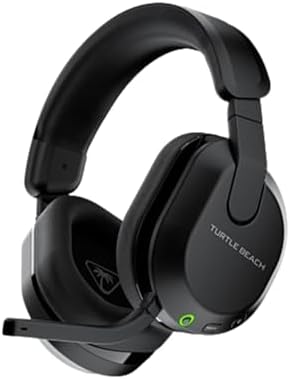
- Best for switching between wireless and Bluetooth: Turtle Beach Stealth 600. An 80-hour rechargeable battery is the longest battery figure stated in this group.
- Best wired for cross-platform play: JBL Quantum 100M2. One 3.5mm jack covers PC, PlayStation, Xbox, Nintendo Switch, mobile, Mac and VR in its listing.
- Best for voice clarity: Razer BlackShark V2 X.
- Best for lighting and software customisation: Logitech G733 Lightspeed. Lighting personalisation across 16.8M colours is named in its listing.
Quick Answer
Start with the HyperX Cloud III if you want a wired headset that covers PC, PlayStation and Xbox in one listing. Choose the Turtle Beach Stealth 600 if you would rather play without a cable, and choose the JBL Quantum 100M2 if the widest platform list is the priority.
Comparison Table
| Product | Best for | Weight | Connection | Buy |
|---|---|---|---|---|
| JBL Quantum 100M2 | Cross-platform wired play | 0.49 lb | 3.5mm wired | View on Amazon |
| Logitech G733 Lightspeed | Lighting and software customisation | 0.61 lb | Lightspeed wireless | View on Amazon |
| Razer BlackShark V2 X | Voice clarity on a wired connection | 0.53 lb in the spec table; 240 g in the listing facts | 3.5mm wired | View on Amazon |
| Turtle Beach Stealth 600 | Switching between wireless and Bluetooth | 1.32 lb | 2.4GHz wireless plus Bluetooth 5.2 | View on Amazon |
| HyperX Cloud III | Three connection options | 0.68 lb | USB-C, USB-A and 3.5mm | View on Amazon |
Decision Guide
Start with the cable question, because it shapes everything else. A wired headset draws its audio through the cable and never needs charging, which suits a fixed desk or console setup where the cable run is short and out of the way. A wireless headset suits a setup where you stand up between matches or play from a sofa, and it trades the cable for a battery that needs charging and a wireless link that needs to stay in range. In this group the wired side is the JBL Quantum 100M2, the Razer BlackShark V2 X and the HyperX Cloud III, while the wireless side is the Logitech G733 Lightspeed and the Turtle Beach Stealth 600. Either way, deciding the connection first saves time, because the remaining differences between models on the same side of that divide are smaller and easier to weigh. If your desk sits close to the console or PC, a cable rarely gets in the way, while a setup where you move between rooms makes the cable a daily annoyance worth removing.
Match the platform list to the devices you actually own. Platform coverage is not identical across these five listings, and the gaps matter more than the overlaps. One listing names PC, PlayStation, Xbox, Nintendo Switch, mobile, Mac and VR together, which covers a household with several systems and a phone. Another names PC, Mac, PlayStation, Xbox One and Nintendo Switch through a 3.5mm jack. A third names PC, PlayStation, Xbox Series X and S, and PlayStation 4, which is a console-focused list with PC included. The two wireless models name different sets again: one lists PC, PlayStation 5, PlayStation 4 and Nintendo Switch, while the other lists PlayStation 5, PlayStation 4, PC and mobile devices only. Before choosing, write down every device you expect to use the headset with, then check each listing against that list line by line. A headset that covers your main system but not your secondary one will still need a second solution.
Think about the microphone as a separate decision from the earcups. The five microphones here differ in how you silence them, so the right one depends on how often you talk during play and how you want to silence yourself mid-match. A player who talks through most of a session will use the microphone constantly, while a player who rarely talks will care less about how it mutes. Ask yourself which muting behaviour you will use every session, because the microphone you interact with most is the one whose design matters most.
Weigh the wireless extras on their own terms. The two wireless models do not offer the same extras, so comparing them means looking past the shared fact that both are wireless. One offers lighting personalisation through software for creating custom lighting. The other offers a mappable wheel and mode button, built-in EQ modes, and a hearing mode named Superhuman Hearing in its listing. If you build your setup around lighting and software profiles, the RGB and software combination is the one that will matter daily.
Consider the driver and sound features listed for each model without treating a single figure as the whole story. Three of the listings state driver sizes, one names a spatial sound compatibility, and one names EQ modes built into the headset. None of those on its own decides which headset suits you, because the listings do not state a common measurement that would let the five be ranked on sound alone. Note which sound feature each listing names, check whether it applies to your operating system or platform, and weigh it alongside connection, microphone and platform coverage rather than ahead of them.
Check the small print in each listing before you decide. The wired Razer listing notes that its surround sound is software-enabled and only available on Windows 10 64-bit. Another listing gives two different colours, with the product name and the spec table disagreeing. Where that disagreement appears, the product section below flags it and tells you to check the product page, because picking one figure silently would mislead you.
Put the finalists side by side on the three things you will notice first. After working through connection, platform, microphone and extras, the shortlist usually comes down to two models: check whether the cable or the wireless link fits your setup, whether the microphone behaves the way you expect, and whether the platform list covers every device you own. If one finalist fails any of those three checks, it is not the right headset for your setup even if it leads on another feature. If both pass, use the remaining spec figures to break the tie. If the figures still leave the choice open, the deciding factor is often how the headset feels over a long session, so weigh the comfort details in each listing alongside the figures.
1. JBL Quantum 100M2 Wired Headset — Best wired cross-platform pick
The JBL Quantum 100M2 is the lightest of the five by its stated spec weight at 0.49 pounds, and it pairs that figure with a 3.5mm jack that its listing names for the widest platform list in this group. Its detachable directional microphone includes a mute option and comes off the headset for solo sessions, while its memory foam ear cushions use a breathable fabric in the listing description. Compatibility with Windows Sonic spatial sound on Windows 10 PCs and Xbox One is also named in its listing, so the trade-off here is the cable itself: the single jack covers many devices, yet it keeps you tethered to whichever device you plug into.
| Spec | From the listing |
|---|---|
| Colour | Black |
| Dimensions | 9.0 x 9.7 x 1.3 inches |
| Weight | 0.49 pounds |
| Connection | 3.5mm jack |
| Microphone | Detachable directional, with mute option |
| Battery | The listing does not state it |
2. Logitech G733 Lightspeed Wireless Headset — Best for lighting and software customisa
The Logitech G733 Lightspeed lists a wireless range of 20 metres with Lightspeed wireless audio transmission, alongside lighting personalisation through dual-zone Lightsync RGB. Its PRO-G drivers are described in the listing as reducing distortion and delivering precise, consistent and rich sound quality, and its Blue VO!CE microphone filters are described as making the voice sound richer, cleaner and more professional. A reversible suspension headband is named for long play sessions, and the listing names PC, PlayStation 5, PlayStation 4 and Nintendo Switch as compatible platforms. Skip it if you need a headset whose listing covers Xbox, because the platforms named here do not include it.
| Spec | From the listing |
|---|---|
| Colour | Black |
| Dimensions | 8.5 x 8.3 x 4.1 inches |
| Weight | 0.61 pounds |
| Wireless range | 20 metres |
| Battery life | Up to 29 hours |
| Microphone | Blue VO!CE mic |
3. Razer BlackShark V2 X Wired Headset — Best for voice clarity
The Razer BlackShark V2 X lists TriForce Titanium 50 mm drivers with titanium-coated diaphragms, divided into three parts for the individual tuning of highs, mids and lows, and its listing facts give its weight as 240 g while the spec table gives 0.53 pounds, which agree once converted, since 240 g equals 0.53 pounds. Its HyperClear cardioid microphone uses an improved pickup pattern that tapers off towards the back and sides, and its closed earcups are described as covering the ears fully for passive noise cancellation with cushions that provide a closer seal. The 3.5mm connection covers PC, Mac, PlayStation 4, Xbox One and Nintendo Switch in the listing, with a note that an Xbox One stereo adapter may be required and is purchased separately. That adapter note is the compromise to weigh: the headset connects widely through one jack, yet Xbox One use may need an extra part.
| Spec | From the listing |
|---|---|
| Colour | Black |
| Dimensions | 7.6 x 6.76 x 3.86 inches |
| Weight | 240 g in the listing facts; 0.53 pounds in the spec table (the two agree once converted) |
| Drivers | TriForce Titanium 50 mm |
| Connection | 3.5mm jack |
| Microphone | HyperClear cardioid |
4. Turtle Beach Stealth 600 Wireless Headset — Best wireless switching
The Turtle Beach Stealth 600 lists a rechargeable 80-hour battery and pairs it with low-latency 2.4GHz wireless plus Bluetooth 5.2. Its QuickSwitch button moves between wireless and Bluetooth, its flip-to-mute microphone uses AI-based noise reduction, and its listing names 50mm drivers alongside built-in EQ modes and Superhuman Hearing. At 1.32 pounds in the spec table it carries the highest stated weight among the five, so the exchange is clear: that battery figure comes with extra weight to carry on your head. Skip it if the colour matters to you without checking first, because the product name says White while the spec table says Black — check the product page.
| Spec | From the listing |
|---|---|
| Colour | White in the product name; Black in the spec table — check the product page |
| Dimensions | 8.58 x 7.81 x 3.74 inches |
| Weight | 1.32 pounds |
| Battery | 80 hours, rechargeable |
| Drivers | 50 mm |
| Connection | 2.4GHz wireless plus Bluetooth 5.2 |
5. HyperX Cloud III Wired Headset — Best overall
The HyperX Cloud III lists angled 53mm drivers tuned by HyperX audio engineers, and its 10mm microphone is noise-cancelling with a built-in mesh filter and an LED mute indicator that shows when you are muted. Its listing names three connection types — USB-C, USB-A and 3.5mm. Its stated weight is 0.68 pounds in the spec table. The limitation to accept is the cable: it still ties you to the device with a cord.
| Spec | From the listing |
|---|---|
| Colour | Black/Red |
| Dimensions | 3.41 x 6.1 x 7.48 inches |
| Weight | 0.68 pounds |
| Drivers | Angled 53 mm |
| Microphone | 10 mm, noise-cancelling, with mesh filter and LED mute indicator |
| Connection | USB-C, USB-A and 3.5mm |
Buying Checklist
- Measure your seating distance from the device before choosing between wired and wireless, because a short cable run suits a desk setup while a longer distance suits a wireless model with a stated range.
- Write down every platform you own and check it against each listing’s platform list, since the five listings name different combinations of PC, PlayStation, Xbox, Nintendo Switch, mobile, Mac and VR.
- Compare the microphone designs side by side and pick the muting behaviour you will use most often.
- Check the stated weight and dimensions in the spec table against a headset you already know, and treat a large gap as a reason to look again at the headband and ear cushion details in that listing.
- Confirm any note that affects what you receive or what else you need, such as an adapter that may be required separately, a feature limited to one operating system, or a figure that disagrees between the product name and the spec table.
- Compare two or three finalists side by side on connection, platform coverage and microphone design first, then use the remaining spec figures to break the tie, and check the return window on the product page before you commit.
FAQ
Should I choose a wired or a wireless gaming headset?
Choose wired if you play at a fixed desk or console setup and want to remove charging from the routine, since the JBL, Razer and HyperX models in this guide connect by cable. Choose wireless if you move around during sessions or play from a sofa, since the Logitech and Turtle Beach models connect without a cable and each lists a battery figure in its listing. The deciding question is whether a cable or a charging routine will bother you more over weeks of play.
Will one headset work with my PC, PlayStation, Xbox and Nintendo Switch?
It depends on the model, because the platform lists in this guide are not identical. The JBL listing names PC, PlayStation, Xbox, Nintendo Switch, mobile, Mac and VR together, while the other listings name narrower combinations, and the Turtle Beach listing limits compatibility to PlayStation 5, PlayStation 4, PC and mobile devices only. Check your own device list against the listing for the model you are considering before deciding.
What should I check about the microphone before I buy a gaming headset?
Check how the microphone mutes, because that behaviour differs across the five models here. The product sections below describe each design in turn, so match the muting action to the one you can perform without thinking during a match. Pick the design you will rely on most, since that is the one whose behaviour matters every session.
Final Verdict
The HyperX Cloud III is the starting point in this group because it pairs angled drivers with three connection types in one listing, which covers the things most buyers notice first: sound hardware and connection options. The Turtle Beach Stealth 600 is the alternative for anyone who wants to play without a cable. The JBL Quantum 100M2 suits a household with many platforms and one 3.5mm jack, the Razer BlackShark V2 X suits a player who puts voice clarity first, and the Logitech G733 Lightspeed suits a player who wants lighting and software control as part of the setup. Whichever direction you take, confirm the platform list, the microphone behaviour and any conflicting figure on the product page first, because those three checks decide whether the headset fits your setup in practice rather than on paper.
Prime covers fast, free delivery on eligible items. See whether a Prime free trial is available for your account.
Check Prime on Amazon →Types of Headsets and Headphones
Headsets and headphones are grouped mainly by connection type and by how they handle outside noise.
Wired headsets avoid battery concerns and input lag. Wireless/Bluetooth headsets remove the cable but add some latency and depend on battery charge. Open-back headphones let sound (and some noise) pass through the ear cup, generally giving a more natural soundstage; closed-back headphones seal the ear cup for more isolation and bass. Active noise cancellation (ANC) uses electronics to actively cancel outside noise; passive isolation just physically blocks sound via the ear cup's seal, with no electronics involved.
Wireless gaming headsets using a dedicated USB receiver generally have less audio lag than Bluetooth, since standard Bluetooth audio codecs add more processing delay than a direct wireless link.
Frequently Asked Questions
What's the difference between active noise cancellation (ANC) and passive isolation?
ANC uses electronics to actively cancel outside noise; passive isolation just physically blocks sound via the ear cup's seal, with no electronics or battery involved.
Open-back vs closed-back headphones — what's the real-world difference?
Open-back designs let sound pass through the ear cup for a more natural soundstage but leak sound both ways; closed-back designs seal the ear cup for more isolation and typically stronger bass.
Does a wireless gaming headset add noticeable audio lag compared to wired?
A dedicated USB receiver generally adds less lag than standard Bluetooth, since common Bluetooth audio codecs add more processing delay than a direct wireless link.
Related Guides
- Best USB Wi-Fi Adapters
- Best PS5 Controller with Paddles
- Best Laptop with 512GB SSD Storage
- Best DDR4 RAM AMD

Write Your Review
No reviews yet. Be the first to share your experience!