
For desktop PC capture, start with the two quad HDMI cards: the Magewell Pro Capture Quad HDMI and the Blackmagic DeckLink Quad HDMI each take four HDMI sources over PCIe, and the Datapath VisionRGB-E1S covers a single analog or DVI source. Two listings need plain warnings. The GeoVision GV800-16 gives almost no facts beyond its model name, so its capture role rests on its product name alone (product name), and the PCI-1784U is not a video capture card at all: it counts rotary encoder pulses for motion control.
The two quad cards tie at four HDMI inputs, then split on detail: the Magewell states input up to 2048×2160 and up to 144 fps with on-board FPGA processing, while the Blackmagic card states 12-bit RGB 4:4:4 up to 4Kp30 DCI, HDR support and an 8-lane PCIe gen 3 slot requirement. Stated weights run from 0.28 to 3.0 pounds, so size planning differs sharply here.
As an Amazon Associate, we earn from qualifying purchases.
Pick by Your Need
- Best overall: Magewell Pro Capture Quad HDMI. Four HDMI inputs, input up to 2048×2160, and FPGA processing that reduces host CPU load.
- Best for 4K HDMI sources: Blackmagic DeckLink Quad HDMI. Four HDMI 2.0b inputs with RGB 4:4:4 up to 4Kp30 DCI, HDR and Rec. 2020 support.
- Best for legacy sources: Datapath VisionRGB-E1S. A single channel that captures analog or DVI data and moves it to the host by DMA.
- Most channels, unverified: GeoVision GV800-16. Its 16 channels rest on its product name (product name), with no interface or format facts given; verify it on the product page first.
- Not a video capture card: PCI-1784U encoder counter card. It counts quadrature encoder pulses on four axes and captures no video of any kind.
Quick Answer
The Magewell and Blackmagic cards are the two complete video capture answers here, tied at four HDMI inputs apiece. The Datapath card fits one analog or DVI source. Treat the GeoVision as a partial match whose capture role is name-only (product name), and skip the PCI-1784U for video entirely: an encoder counter card, and a strict mismatch for this keyword.
Comparison Table
| Product | Video inputs | Max input in facts | Interface | Weight |
|---|---|---|---|---|
| Blackmagic DeckLink Quad HDMI | 4 × HDMI 2.0b | 4Kp30 DCI, RGB 4:4:4 | PCIe 8-lane gen 3 | 0.28 lb |
| Magewell Pro Capture Quad HDMI | 4 × HDMI | 2048×2160, up to 144 fps | PCIe Gen2 (product name) | 0.63 lb |
| GeoVision GV800-16 | 16 channels (product name) | not stated | not stated | 3.0 lb |
| Datapath VisionRGB-E1S | 1 × analog/DVI | not stated | PCI Express (product name) | not stated |
| PCI-1784U Encoder Counter | No video input; 4 encoder axes | not stated | PCI (product name) | not stated |
Decision Guide
For several HDMI sources at once, choose between the two quad cards: they tie at four inputs, so decide on the stated extras — the Magewell’s FPGA processing or the Blackmagic card’s HDR support and 8 channels of embedded 24-bit 48 kHz audio. For a single older analog or DVI feed, the Datapath card is the only stated input path here that accepts it. If the GeoVision’s channel count draws you, treat it as unconfirmed: its 16 channels rest on its product name (product name), and its facts give no interface or input type, so the product page must supply both first. The PCI-1784U belongs in a motion-control guide instead.
1. Blackmagic DeckLink Quad HDMI — Best for 4K HDMI Sources

This card captures four HDMI 2.0b sources at once, with 8, 10 and 12-bit RGB 4:4:4 up to 4Kp30 DCI, YUV 4:2:2, Deep Color and HDR. One figure needs care: its name advertises up to 4K60 (product name), while its facts cap RGB 4:4:4 at 4Kp30 DCI, so re-check the product page for your recording mode. It needs an 8-lane PCIe gen 3 slot, works on Mac, Windows and Linux, and pairs with Media Express, Wirecast, vMix and OBS. At 6.0 x 6.0 x 1.0 inches and 0.28 pounds, it is the lightest stated card here.
Pros
- Four HDMI 2.0b inputs capture simultaneously, tied with the Magewell for the most HDMI inputs stated
- 12-bit RGB 4:4:4 with HDR and Rec. 2020 support, the deepest color detail stated here
- 8 channels of embedded 24-bit 48 kHz audio stated in its facts
Cons
- Its name’s 4K60 figure (product name) sits above the 4Kp30 DCI cap its facts state for RGB 4:4:4
- Gives no on-board processing, where the Magewell states FPGA scaling, cropping and de-interlacing
| Spec | From the listing |
|---|---|
| Inputs | 4 × HDMI 2.0b |
| Color | 8/10/12-bit RGB 4:4:4 up to 4Kp30 DCI |
| Interface | PCIe 8-lane gen 3 |
| Weight | 0.28 pounds |
2. Magewell Pro Capture Quad HDMI — Best Overall

The Magewell also captures four HDMI channels at once, states input up to 2048×2160, and holds the highest stated frame rate here, up to 144 fps depending on system bandwidth. Its FPGA handles cropping, scaling, de-interlacing and OSD composition on the card, reducing host CPU load. Color support runs to 8, 10 and 12-bit, and audio reaches up to 8 channels per input. Its PCIe Gen2 interface rests on its product name (product name); at 7.8 x 8.65 x 1.65 inches and 0.63 pounds it is larger and heavier than the Blackmagic card.
Pros
- On-board FPGA processing for scaling, cropping and de-interlacing, a feature no rival states
- Highest stated frame rate here at up to 144 fps, with input up to 2048×2160
- Up to 8 channels of audio per input across four inputs
Cons
- Larger and heavier than the Blackmagic card at 8.65 inches wide and 0.63 pounds
- Its PCIe Gen2 interface rests on its product name (product name), so slot details need a product-page check
| Spec | From the listing |
|---|---|
| Inputs | 4 × HDMI |
| Max input resolution | 2048×2160 |
| Audio | Up to 8 channels per input |
| Weight | 0.63 pounds |
3. GeoVision GV800-16 Capture Card — Best Channel Count (product name)
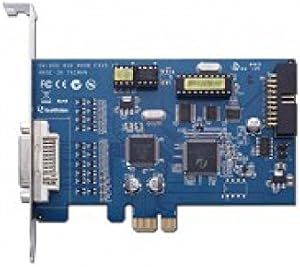
This listing is a partial match because of how little it states: its facts give only the model name, GeoVision GV800-16 — no interface, input type, resolution or software detail. Its capture role and 16 channels rest on its product name (product name), so both need confirming on the product page before any capture comparison. What the listing does state is physical: 12.0 x 9.0 x 4.0 inches and 3.0 pounds, the largest and heaviest stated figures in this group.
Pros
- 16 channels in its product name (product name), the highest channel figure in this group
- Its name claims 16 channels (product name), a figure its facts never back
- Full dimensions and weight stated, where the Datapath and encoder listings give neither
Cons
- Its listing gives no interface, input type or resolution, so its connection and formats are unconfirmed
- Heaviest and largest stated card here at 3.0 pounds and 12.0 x 9.0 x 4.0 inches
| Spec | From the listing |
|---|---|
| Model | GeoVision GV800-16 |
| Channels | 16 (product name) |
| Interface | The listing does not state it |
| Input resolution | The listing does not state it |
| Weight | 3.0 pounds |
4. Datapath VisionRGB-E1S Capture Card — Best for Analog and DVI Sources

The VisionRGB-E1S is the single-channel card here: it captures analog or DVI data, triple buffers it into onboard storage, then copies it by DMA to the host system for display, storage or streaming. When a Datapath graphics card is installed, it transfers data directly to that card, which its facts say increases performance. Its spec table gives a Multicolor finish only, so its dimensions and weight are missing from the listing and need a product-page check.
Pros
- Captures analog and DVI data, the only stated non-HDMI input path in this group
- Triple buffers captured data into onboard storage before DMA transfer to the host
- Direct transfer to a Datapath graphics card when one is installed
Cons
- A single channel, one quarter of the four inputs the Blackmagic and Magewell cards state
- Its listing gives no dimensions or weight, so card size and slot fit need a product-page check
| Spec | From the listing |
|---|---|
| Channels | 1 |
| Input | Analog / DVI |
| Finish | Multicolor |
| Dimensions | The listing does not state it |
| Weight | The listing does not state it |
5. PCI-1784U Encoder Counter Card — Best for Encoder Counting, Not Video

This card is a strict mismatch for the keyword, and its section exists so nobody buys it by mistake: a 4-axis quadrature rotary encoder counter card that counts encoder pulses for motion control and captures no video, no HDMI feed and no camera signal. The word capture in its name refers to counter capture, not image capture. Its listing adds nothing beyond that name: no spec table, no dimensions, no weight and no software facts.
Pros
- Counts quadrature encoder signals across 4 axes, a function none of the video cards here performs
- PCI form (product name), matching the internal-card format of the group
- Its name states its exact function plainly
Cons
- Captures no video at all, so it cannot record any camera, console or other video source
- Its listing gives no dimensions, weight or software facts, so even encoder buyers must re-check the product page
| Spec | From the listing |
|---|---|
| Function | 4-axis quadrature rotary encoder counter |
| Axes | 4 |
| Interface | PCI (product name) |
| Dimensions | The listing does not state it |
| Weight | The listing does not state it |
Shopping Checklist
- Confirm the card captures video first: one listing here counts encoder pulses instead, and the GeoVision’s capture role rests on its product name alone (product name).
- Check your motherboard for a free slot with the lanes each card requires, starting with the Blackmagic card’s 8-lane gen 3 need.
- Match the input type to your sources: HDMI for the two quad cards, analog or DVI for the Datapath card.
- Measure case clearance against stated dimensions, which run from 6.0 x 6.0 to 12.0 x 9.0 inches.
- Re-check the product page for any figure a listing leaves out, and check its return window before ordering.
FAQ
How many capture channels do I need?
One channel per source you record at the same time. The Blackmagic and Magewell cards each state four HDMI inputs, the Datapath card states a single channel, and the GeoVision’s 16 channels rest on its product name (product name), so confirm it on the product page before planning around it.
What should I check about my PC before buying an internal capture card?
Check the free slot and its lane count first: the Blackmagic card requires an 8-lane PCIe gen 3 slot, fits 8 and 16 lane slots, and states Mac, Windows and Linux support. Also compare stated dimensions with your case; stated lengths run from 6.0 to 12.0 inches.
Is every product sold as a capture card made for video?
Not always: the PCI-1784U carries capture card in its name but counts rotary encoder pulses for motion control and records no picture. Read what a card captures, not just what it is called, and re-check the product page when a listing states as little as the GeoVision’s does.
Final Verdict
The Magewell Pro Capture Quad HDMI is the most completely specified card here, and the Blackmagic DeckLink Quad HDMI matches it input for input with stronger stated color and HDR detail. The Datapath VisionRGB-E1S is a narrow but genuine fit for one analog or DVI source. The GeoVision GV800-16 stays a partial match until its product page confirms what its name promises, and the PCI-1784U is a strict mismatch that counts encoder pulses instead of capturing video.
Prime covers fast, free delivery on eligible items. See whether a Prime free trial is available for your account.
Check Prime on Amazon →Product and ASIN Reference
| Product | ASIN |
|---|---|
| Blackmagic DeckLink Quad HDMI | B07PGT6RQC |
| Magewell Pro Capture Quad HDMI | B0178DV064 |
| GeoVision GV800-16 | B0010EP9O2 |
| Datapath VisionRGB-E1S | B00HSV8D4Y |
| PCI-1784U Encoder Counter Card | B0H3NZL97V |

Write Your Review
No reviews yet. Be the first to share your experience!