
A mouse that is too small forces a large hand into a cramped grip during a long workday. The five Logitech mice below are all full-size models made for larger hands, so the comparison comes down to scrolling, side buttons, battery life, and how each one connects.
Two of the five are the same mouse in two colors. The Signature M650 L appears once in Black and once in Off White, with the same length, width, height, and weight in the listing details. That leaves four distinct models to compare.
As an Amazon Associate, we earn from qualifying purchases.
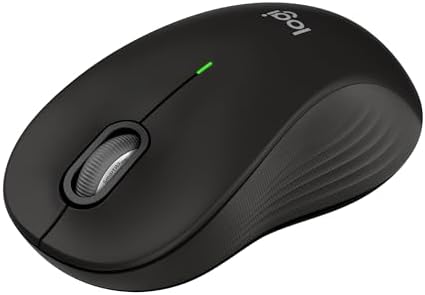


Pick by Your Need
- Best overall: Logitech Signature M550 L. Full-size shape for larger hands with a 2-year battery and SmartWheel scrolling.
- Best for custom buttons: Logitech Signature M650 L in Black. Customizable side buttons plus 90 percent less click noise.
- Best for three devices: Logitech Signature Plus M750 L. Switches between up to three Bluetooth devices with Flow.
- Best simple pick: Logitech Advanced Wireless Mouse 2. Large-size shape with a scroll wheel and one included AA battery.
- Best light color: Logitech Signature M650 L in Off White. The same M650 L mouse as the Black model, in a light color.
Quick Answer
All five mice here are full-size Logitech models made for larger hands, and the M550 L, M650 L, and M750 L share SmartWheel scrolling with line-by-line precision and a super-fast mode for long pages. The M750 L switches between up to three Bluetooth devices, the M650 L adds customizable side buttons, and the Advanced Wireless Mouse 2 keeps the list short with a scroll wheel and one AA battery.
Comparison Table
| Mouse | Color | Dimensions (L x W x H) | Weight | Battery | Connection | Buy |
|---|---|---|---|---|---|---|
| Logitech Signature M550 L | Black | Not stated | 0.25 pounds | 2-year battery | Bluetooth Low Energy or Logi Bolt USB receiver | View on Amazon |
| Logitech Signature M650 L | Black | 4.65 x 2.58 x 1.63 inches | 0.25 pounds | 2-year battery | Bluetooth Low Energy or Logi Bolt USB receiver | View on Amazon |
| Logitech Signature Plus M750 L | Graphite | 4.67 x 2.61 x 0.1 inches (as listed) | 0.25 pounds | 24-month battery | Bluetooth, up to three devices | View on Amazon |
| Logitech Advanced Wireless Mouse 2 | Black | Not stated | Not stated | 1x AA battery included | Wireless USB Bluetooth | View on Amazon |
| Logitech Signature M650 L | Off White | 4.65 x 2.58 x 1.63 inches | 0.25 pounds | 2-year battery | Bluetooth Low Energy or Logi Bolt USB receiver | View on Amazon |
Decision Guide: Match the Mouse to Your Hand and Your Setup
Start with size. Every mouse here is a full-size model for larger hands, and the two M650 L models and the M750 L all measure close to 4.65 inches long and 2.6 inches wide. The M550 L gives no dimensions in its listing, so its size claim rests on the Large Size label. The M750 L lists a height of 0.1 inches, a figure that looks out of line next to the 1.63-inch height of the M650 L, so check the product page before counting on that number.
Next, weigh scrolling against buttons. The M550 L, both M650 L models, and the M750 L all use SmartWheel scrolling, which gives line-by-line precision for documents and a super-fast mode for long web pages. Only the M650 L pair names customizable side buttons, while the Advanced Wireless Mouse 2 names only a scroll wheel.
Battery life splits the group in two. The M550 L and both M650 L models carry a 2-year battery in their titles, and the M750 L carries a 24-month battery, the same length stated in months. The Advanced Wireless Mouse 2 takes one included AA battery and states no battery life figure.
Connection options matter most for multi-device desks. The M550 L and both M650 L models connect through Bluetooth Low Energy or a Logi Bolt USB receiver. The M750 L adds switching between up to three Bluetooth devices with Flow, moving text, images, and files between Windows and macOS systems. The Advanced Wireless Mouse 2 lists wireless USB Bluetooth with no device count.
Click noise is the last split. The M650 L pair and the M750 L state 90 percent less click noise. The M550 L names no percentage figure, and the Advanced Wireless Mouse 2 names no click-noise figure at all. All five weigh 0.25 pounds where a weight is stated, so weight does not separate them.
1. Logitech Signature M550 L — Best overall full-size pick
The M550 L pairs SmartWheel scrolling with a 2-year battery and a Logi Bolt USB receiver, and its listing gives no length, width, or height figures. At 0.25 pounds it matches the stated weight of the M650 L pair and the M750 L. Its contoured shape and rubber side grips are the listed fit features.
Pros
- SmartWheel scrolling with line-by-line precision and a super-fast mode
- 2-year battery stated in the title
- Connects through Bluetooth Low Energy or the Logi Bolt USB receiver
Cons
- No length, width, or height figures in the listing
- No customizable side buttons named, unlike the M650 L pair
| Spec | From the listing |
|---|---|
| ASIN | B0CPSP33T8 |
| Brand | Logitech |
| Color | Black |
| Size | Large Size |
| Weight | 0.25 pounds |
| Battery | 2-year battery |
2. Logitech Signature M650 L Black — Best for custom side buttons
The M650 L in Black is the only mouse here besides its Off White twin that names customizable side buttons, and it pairs those buttons with the listing’s named SilentTouch technology at 90 percent less click noise, a figure the M550 L does not state. Its 4.65 by 2.58 by 1.63 inch body is the only set of dimensions here with a height above one inch.
Pros
- Customizable side buttons, a feature the M550 L and M750 L do not name
- 90 percent less click noise
- Full dimensions stated: 4.65 by 2.58 by 1.63 inches
Cons
- Same mouse as the Off White M650 L apart from color
- No switching between multiple devices, unlike the M750 L
| Spec | From the listing |
|---|---|
| ASIN | B09KX9P829 |
| Brand | Logitech |
| Color | Black |
| Dimensions | 4.65 x 2.58 x 1.63 inches |
| Weight | 0.25 pounds |
| Battery | 2-year battery |
3. Logitech Signature Plus M750 L — Best for switching between three devices
The M750 L is the only mouse here that switches between up to three Bluetooth devices with Flow, moving text, images, and files between Windows and macOS systems, and it is the only one whose battery is stated as 24 months. Its 4.67 by 2.61 inch footprint is the widest and longest of the three mice with stated dimensions, and Graphite is the only color here that is neither Black nor Off White. SmartWheel and 90 percent less click noise are shared with the M650 L pair.
Pros
- Switches between up to three Bluetooth devices with Flow
- 24-month battery stated in the title
- 90 percent less click noise
Cons
- The listed height of 0.1 inches looks out of line with the M650 L, so check the product page
- No Logi Bolt USB receiver named, unlike the M550 L and M650 L pair
| Spec | From the listing |
|---|---|
| ASIN | B0DKBW73R3 |
| Brand | Logitech |
| Color | Graphite |
| Dimensions | 4.67 x 2.61 x 0.1 inches |
| Weight | 0.25 pounds |
| Battery | 24-month battery |
4. Logitech Advanced Wireless Mouse 2 — Best simple large-size pick
The Advanced Wireless Mouse 2 is the only mouse here built from a short listing, with a scroll wheel, one included AA battery, and wireless USB Bluetooth as its whole feature set, and it is the only one with no stated weight, no stated dimensions, and no stated battery life. Its large-size label and Black color match the M550 L. With no SmartWheel, no side buttons, and no click-noise figure in its listing, it is the plainest pick of the five.
Pros
- One AA battery included in the box, the only replaceable-battery model here
- Large-size shape for larger hands
- Scroll wheel named in the listing facts
Cons
- No weight, dimensions, or battery life figure in the listing
- No SmartWheel, side buttons, or click-noise figure named
| Spec | From the listing |
|---|---|
| ASIN | B0DFTXPLTX |
| Brand | Logitech |
| Color | Black |
| Battery | 1x AA battery included |
| Weight | The listing does not state it |
| Dimensions | The listing does not state it |
5. Logitech Signature M650 L Off White — Best light-color M650 L
The M650 L in Off White is the same mouse as the M650 L in Black, with the same 4.65 by 2.58 by 1.63 inch body, the same 0.25-pound weight, the same customizable side buttons, and the same 90 percent less click noise. Its Off White color is the only difference between the two listings, and it is the only light-colored mouse of the five. Against the M550 L it adds customizable side buttons and a stated click-noise figure.
Pros
- Same M650 L specs as the Black model, in an Off White color
- Customizable side buttons with 90 percent less click noise
- Full dimensions stated: 4.65 by 2.58 x 1.63 inches
Cons
- Identical to the Black M650 L apart from color
- No switching between multiple devices, unlike the M750 L
| Spec | From the listing |
|---|---|
| ASIN | B09NQNRJTK |
| Brand | Logitech |
| Color | Off White |
| Dimensions | 4.65 x 2.58 x 1.63 inches |
| Weight | 0.25 pounds |
| Battery | 2-year battery |
Buying Checklist
- Measure your hand against the stated dimensions: 4.65 by 2.58 by 1.63 inches for the M650 L pair and 4.67 by 2.61 inches for the M750 L.
- Pick the M650 L pair if customizable side buttons matter, and pick the color you prefer, since the Black and Off White models are the same mouse.
- Pick the M750 L if you switch between up to three Bluetooth devices and move files between Windows and macOS systems.
- Pick the Advanced Wireless Mouse 2 for a plain large-size mouse with one included AA battery.
- Check the connection type: Bluetooth Low Energy or Logi Bolt USB receiver for the M550 L and M650 L pair, Bluetooth with three-device switching for the M750 L, and wireless USB Bluetooth for the Advanced Wireless Mouse 2.
FAQ
Which Logitech mouse here fits the largest hands?
The stated dimensions put the M750 L at 4.67 by 2.61 inches and the M650 L pair at 4.65 by 2.58 by 1.63 inches. The M550 L and the Advanced Wireless Mouse 2 give no length, width, or height in their listings, so their size claim rests on the Large Size label alone. Check the product page for the M750 L height figure, since the listed 0.1 inches looks out of line with the other full-size mice here.
Are the two M650 L models really the same mouse?
Yes, the Black and Off White M650 L models share the same dimensions, weight, customizable side buttons, SmartWheel scrolling, 90 percent less click noise, and 2-year battery in the listing details. The color is the only difference between the two listings. Pick the color you prefer, and treat them as one model with two color options when you compare them against the other three mice here.
How long do the batteries last on these mice?
The M550 L and both M650 L models state a 2-year battery, and the M750 L states a 24-month battery, the same length stated in months. The Advanced Wireless Mouse 2 takes one AA battery, included in the box, and its listing states no battery life figure.
Final Verdict
The M550 L suits a large hand that wants SmartWheel scrolling, a 2-year battery, and a Logi Bolt USB receiver. The M650 L pair adds customizable side buttons and 90 percent less click noise, and the two colors are the same mouse, so pick Black or Off White and move on. The M750 L is the pick for a desk with up to three Bluetooth devices, with three-device switching and Flow and a 24-month battery, though its listed height of 0.1 inches needs a check on the product page. The Advanced Wireless Mouse 2 is the pick for a plain large-size mouse with one included AA battery and no stated battery life.
Prime covers fast, free delivery on eligible items. See whether a Prime free trial is available for your account.
Check Prime on Amazon →Types of Computer Mice
Computer mice are grouped mainly by connection type and by grip/sensor design.
Wired mice avoid any input lag or battery concerns at the cost of a cable. Wireless mice (2.4GHz dongle or Bluetooth) remove the cable but rely on battery or rechargeable power. Gaming mice prioritize sensor precision (DPI range) and programmable buttons. Ergonomic mice use a vertical or angled grip shape aimed at reducing wrist strain. Trackball mice keep the mouse body still and move the cursor by rolling an exposed ball with a finger or thumb instead of moving the whole mouse.
Higher DPI isn't automatically better — it controls cursor sensitivity, not accuracy, and many users find a moderate DPI paired with the right in-software sensitivity setting more comfortable than maxing out the sensor's rated range.
Frequently Asked Questions
What does DPI mean on a gaming mouse?
DPI (dots per inch) controls cursor sensitivity — how far the cursor moves per inch of physical mouse movement — not the sensor's accuracy or build quality.
What's the difference between a trackball mouse and a standard mouse?
A trackball mouse stays stationary and moves the cursor by rolling an exposed ball with a finger or thumb, instead of moving the whole mouse body across a surface.
Does mouse weight matter for gaming vs everyday use?
Lighter mice are often preferred for fast, precise gaming movements, while weight preference for everyday use comes down more to personal comfort than performance.
Related Guides
Related guides for this topic are not listed here.


Write Your Review
No reviews yet. Be the first to share your experience!