
The SanDisk G-Drive is the pick for buyers who want an aluminum enclosure and stated transfer speeds, while the WD Elements suits a crowded desk and the Seagate One Touch suits a desk with no free wall outlet. All five drives in this roundup are desktop models with 20TB or 24TB of stated capacity, and each one connects over USB, so the choice comes down to Mac support, power, stated speed and the size of the box on the desk.
The five listings differ most on what they say about durability, Mac support and speed, so the sections below state what each listing says and what it leaves out. We compared the five listings side by side on capacity, interface, weight, dimensions and system support. The sections below give each drive its own badge, its own numbers and its own trade-off.
As an Amazon Associate, we earn from qualifying purchases.

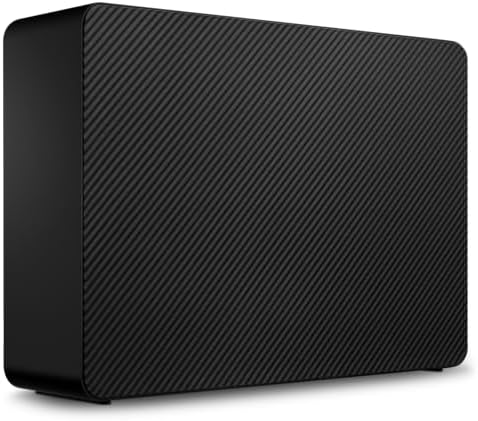


Pick by Your Need
- Best overall: SanDisk G-Drive 24TB. It holds an enterprise-class Ultrastar drive in a stated aluminum enclosure.
- Best for a small desk: WD Elements 20TB. Its 1.89-inch width and 1.98-pound weight suit a crowded desk.
- Best for simple setup: Seagate Expansion 24TB. Drag-and-drop saving and automatic recognition of Windows and Mac computers are stated.
- Best for always-on use: OSENTRiX BX100 24TB. Its 7200 RPM drive is stated for 24/7 operation.
- Best bus-powered pick: Seagate One Touch 24TB. It runs on USB-C bus power with no wall outlet required.
Quick Answer
The G-Drive is the pick for an aluminum enclosure and stated speeds, the WD Elements is the pick for a small desk, and the One Touch is the pick for a desk with no free outlet. The OSENTRiX adds a 24/7-rated drive and a 10Gbps interface, while the Expansion adds Rescue services and drag-and-drop setup. Check the stated capacity and system support before choosing, since the WD states 20TB and the other four state 24TB.
Comparison Table
| Product | Best for | Key figures from the listing | Trade-off | Buy |
|---|---|---|---|---|
| WD Elements 20TB | Small desk | 20TB; USB 3.0; 1.98 lb | Mac use needs reformatting | View on Amazon |
| Seagate Expansion 24TB | Simple setup | 24TB; USB 3.0; 2.95 lb | Needs a power adapter | View on Amazon |
| OSENTRiX BX100 24TB | Always-on use | 24TB; 10Gbps USB-C; 4.0 lb | About 22TB after formatting | View on Amazon |
| SanDisk G-Drive 24TB | Stated durability | 24TB; 280MB/s read/write; 2.91 lb | Windows use needs reformatting | View on Amazon |
| Seagate One Touch 24TB | No wall outlet | 24TB; USB-C bus power; 2.59 lb | No transfer speed stated | View on Amazon |
Decision Guide
Capacity is the first filter. Four picks state 24TB and the WD Elements states 20TB, so the WD only makes sense when 20TB covers the backup plan. The OSENTRiX listing adds one wrinkle: its 24TB drive holds an estimated 22TB after formatting, so check the product page if every terabyte matters.
Then check the system. The G-Drive is Mac Ready and Time Machine compatible, while the WD needs reformatting for MacOS and the Expansion needs reformatting for Time Machine use. The OSENTRiX and the One Touch both state Windows and macOS support.
Then check power and desk space. The One Touch needs no wall outlet, drawing power over USB-C, while the Expansion needs a power adapter and a USB cable. Measure the desk first: the five boxes differ in length, width and height, and the spec tables below give each stated figure, so measure before ordering. Weight matters too when the drive moves between rooms, so check the stated weight in each spec table before choosing.
Durability is the last filter, and it is the thinnest one here. The G-Drive listing describes an anodized aluminum enclosure that offers premium durability, and the OSENTRiX listing states a 7200 RPM drive for 24/7 operation. The other three listings describe capacity, interface and size, so check the product page if the enclosure material is the priority.
1. WD Elements 20TB Desktop — Best Compact Desktop Drive
The WD Elements has the smallest stated footprint here, at 10.04 square inches from its stated 5.31-inch length and 1.89-inch width, and it is also the lightest stated weight here at 1.98 pounds. It is the only pick that states 20TB, and it is plug-and-play ready for Windows PCs with fast data transfers stated. The trade-off is Mac use: reformatting is required for MacOS, so pick the G-Drive or the OSENTRiX for Mac-first backup.
Skip it if the backup plan needs 24TB or Mac plug-and-play.
| Spec | From the listing |
|---|---|
| Capacity | 20TB |
| Interface | USB 3.0 |
| Dimensions | 5.31 × 1.89 × 6.53 inches |
| Weight | 1.98 pounds |
| Color | Black |
2. Seagate Expansion 24TB Desktop — Best for Simple Setup
The Seagate Expansion states 24TB and Rescue Data Recovery Services, and it saves files by drag-and-drop right out of the box with automatic recognition of Windows and Mac computers. Its stated size is 7.04 inches long, 1.65 inches wide and 4.92 inches high at 2.95 pounds. The listing states fast file transfers, and the drive works with Windows and Mac computers once the power adapter and USB cable are connected. The catch is the port version: one listing line reads USB 3.3 while the product name states USB 3.0, so check the product page before choosing by port version.
| Spec | From the listing |
|---|---|
| Capacity | 24TB |
| Interface | USB 3.0 |
| Dimensions | 7.04 × 1.65 × 4.92 inches |
| Weight | 2.95 pounds |
| Color | DESKTOP |
3. OSENTRiX BX100 24TB USB-C — Best for 24/7 Operation
The OSENTRiX BX100 brings a 10Gbps USB-C interface and a 7200 RPM drive stated for 24/7 operation, tied with the G-Drive for the fastest stated interface here at 10Gbps. It states 24TB for files, photos, videos, music and more, with plug-and-play use on Windows and macOS and no software installation required. The listing frames the drive for backups, media libraries and OS system storage, and for desktop or console storage needs. The compromise is formatted capacity: the listing estimates about 22TB after formatting, not the full 24TB, and the 4.0-pound stated weight is the heaviest stated weight here.
| Spec | From the listing |
|---|---|
| Capacity | 24TB |
| Interface | USB 3.2 Gen 2 USB-C (10Gbps) |
| Drive | 7200 RPM |
| Dimensions | 8.0 × 5.0 × 1.6 inches |
| Weight | 4.0 pounds |
| Color | Black |
4. SanDisk G-Drive 24TB Enterprise — Best for Stated Durability
The SanDisk G-Drive is the only pick in this roundup that states an anodized aluminum enclosure and premium durability, with an enterprise-class Ultrastar 7200RPM drive inside. It states USB-C at 10Gbps with up to 280MB/s read and 280MB/s write, the only pick that states read and write speeds, and it is Mac Ready and Apple Time Machine compatible. The listing also states a stackable enclosure, which suits a desk with more than one drive. The downside is system order: Windows use needs reformatting, and the 280MB/s figures are up to speeds based on internal testing that may vary with the host device.
| Spec | From the listing |
|---|---|
| Capacity | 24TB |
| Interface | USB-C (10Gbps), up to 280MB/s |
| Drive | Enterprise-class Ultrastar 7200RPM |
| Dimensions | 8.27 × 5.24 × 1.61 inches |
| Weight | 2.91 pounds |
| Color | Dark Grey |
5. Seagate One Touch 24TB USB-C — Best Bus-Powered Desktop
The Seagate One Touch is the only pick that states bus-powered USB-C use, with no wall outlet required and one port and one cord for a quick connection. It states 24TB and Rescue Recovery, with stated dimensions of 8.58 inches long, 8.35 inches wide and 3.03 inches high at 2.59 pounds. The compromise is desk space: it takes the largest stated footprint here at 71.64 square inches.
Skip it if the desk is already crowded with wide boxes.
| Spec | From the listing |
|---|---|
| Capacity | 24TB |
| Interface | USB-C bus-powered |
| Dimensions | 8.58 × 8.35 × 3.03 inches |
| Weight | 2.59 pounds |
| Color | The listing does not state it |
Shopping Checklist
- Measure the desk first and compare the stated length, width and height of each box against the free space.
- Check system support before buying: on a Mac, the WD and the Expansion each need a reformat, for MacOS and Time Machine use in turn.
- Check the power setup: the One Touch needs no wall outlet, while the Expansion needs a power adapter.
- Check the stated capacity after formatting: the OSENTRiX listing estimates about 22TB from a 24TB drive.
- Check the product page for the latest details before choosing.
FAQ
Which of these drives work with a Mac?
Mac support splits across the five: the G-Drive arrives Mac Ready with Time Machine compatibility, while the OSENTRiX and the One Touch state Windows and macOS support. The WD and the Expansion both need reformatting on a Mac — the WD for MacOS and the Expansion for Time Machine use — so check the product page before plugging either into a Mac. If the Mac is the only computer, the G-Drive is the straightforward pick.
Which drive works without a wall outlet?
The One Touch draws its power over USB-C, so no wall outlet is needed, and it connects with one port and one cord. The Expansion takes wall power instead, through a power adapter plus a USB cable, so check the desk for a free outlet before choosing it. No power arrangement is stated for the other three, so check the product page if bus power matters.
Can these drives stay plugged in all day?
For always-on use, the OSENTRiX is the pick, with a 7200 RPM drive built for 24/7 operation. No always-on rating is stated for the other four, so confirm always-on use on the product page before leaving the drive running day and night. The OSENTRiX states 24TB, so an always-on backup library has room to grow.
Final Verdict
For buyers who want a metal enclosure and stated read and write speeds, the G-Drive is the one to choose. The WD Elements fits a crowded desk with 20TB, while the One Touch needs no wall outlet at all. The OSENTRiX fits always-on use with its 24/7-rated drive, while the Expansion suits buyers who want Rescue services and drag-and-drop saving. Check the stated capacity, system support and power needs against the desk before choosing.
Prime covers fast, free delivery on eligible items. See whether a Prime free trial is available for your account.
Check Prime on Amazon →Product and ASIN Reference
| Product | ASIN | Buy |
|---|---|---|
| WD Elements 20TB Desktop External Hard Drive | B09VCXWPQG | View on Amazon |
| Seagate Expansion 24TB External Hard Drive | B0DVM1Z46T | View on Amazon |
| OSENTRiX BX100 24TB External Hard Drive | B0GCR94L6F | View on Amazon |
| SanDisk Professional G-Drive 24TB External Hard Drive | B0D19T59C8 | View on Amazon |
| Seagate One Touch 24TB External Hard Drive | B0FH5PM68Z | View on Amazon |
Types of Hard Drives
Hard drives (HDDs) are grouped mainly by physical size and by what workload they're built for.
3.5-inch (desktop) drives spin faster and hold more capacity per drive, needing external power beyond USB alone. 2.5-inch (portable) drives are smaller and often run entirely on USB power. NAS-rated drives are built for 24/7 operation and multi-drive arrays, typically with a longer warranty and vibration tolerance than a standard desktop drive. Higher-RPM drives (7200 vs 5400) trade some noise and heat for faster read/write speeds.
A hard drive is still meaningfully cheaper per terabyte than an SSD at high capacities, which is why it remains common for bulk/archival storage even though SSDs are faster for an OS or actively-used files.
Frequently Asked Questions
What's the difference between a 3.5-inch and a 2.5-inch hard drive?
3.5-inch (desktop) drives spin faster and hold more capacity but usually need external power; 2.5-inch (portable) drives are smaller and often run entirely on USB power.
Why do NAS drives cost more than regular desktop hard drives?
NAS-rated drives are built for 24/7 operation and vibration tolerance in multi-drive arrays, typically backed by a longer warranty than a standard desktop drive of similar capacity.
Is a hard drive still worth buying over an SSD?
For bulk or archival storage, yes — hard drives remain meaningfully cheaper per terabyte at high capacities, even though SSDs are faster for an OS or actively-used files.






Write Your Review
No reviews yet. Be the first to share your experience!