
If you want a clamp confirmed in the listing facts, start with the Acer or the VIVO; for heavy or ultrawide screens, WALI and VIVO carry the highest stated loads. Only two of these five listings state a desk clamp in their facts. The MOUNTUP names a clamp only in its product name (product name), and the HUANUO and WALI give no mount method at all, so those three are partial matches on the mount element.
All five are genuine single monitor arms; the split is verification and range: stated load ceilings run from 15.4 lbs (HUANUO) to 26.4 lbs (WALI), and stated height reach from 16 inches (VIVO) to 18.1 inches (Acer). Match the load window first, then confirm the clamp on the product page where a listing gives no mount method.
As an Amazon Associate, we earn from qualifying purchases.
Pick by Your Need
- Best overall: Acer Single Monitor Mount. C-clamp stated in its facts, with the tallest stated raise at 18.1 inches.
- Best for heavy flat screens: WALI Single Monitor Arm. Highest stated load, 26.4 lbs flat, but no mount method given, a partial match.
- Best for ultrawide screens: VIVO Single Monitor Desk Mount. Covers ultrawides up to 38 inches; heavy-duty desk clamp stated in its facts.
- Best for long reach: MOUNTUP Single Monitor Desk Mount. Longest stated extension at 19.4 inches; clamp name-only (product name), a partial match.
- Best for lighter monitors: HUANUO FlowLift Pro Monitor Arm. Suits 4.4 to 15.4 lb monitors, but no mount method is given, a partial match.
Quick Answer
The Acer and the VIVO are the only full matches: both state a desk clamp in their facts, the Acer with an 18.1-inch raise, the VIVO with ultrawide coverage to 38 inches and a 22 lb limit. The WALI states the highest load and the MOUNTUP the longest extension, but neither confirms a clamp in its facts; the HUANUO’s mount method is missing from its listing.
Comparison Table
| Product | Screen range | Max stated load | Mount | Height reach |
|---|---|---|---|---|
| HUANUO FlowLift Pro | 13-32 inches | 15.4 lbs | not stated | not stated |
| WALI Single Monitor Arm | Up to 34 inches | 26.4 lbs | not stated | 17.3 inches |
| Acer Single Monitor Mount | 17-34 inches | 19.8 lbs | C-clamp or grommet | 18.1 inches |
| MOUNTUP Single Monitor Desk Mount | 17-32 inches | 19.8 lbs | Clamp (product name) | 16.9 inches |
| VIVO Single Monitor Desk Mount | 13-32 inches, ultrawides to 38 inches | 22 lbs | Desk clamp or grommet | 16 inches |
Decision Guide
Start with the load window. A monitor between 4.4 and 15.4 lbs fits every arm here; a flat screen above 22 lbs, up to the WALI’s 26.4 lb flat limit, leaves only the WALI (19.8 lbs curved). The VIVO sits between at 22 lbs; Acer and MOUNTUP cap at 19.8 lbs, the HUANUO at 15.4 lbs. Three arms state a 4.4 lb minimum; the WALI and VIVO give none.
Next, the clamp. The Acer states a C-clamp for desks 0.59 to 3.15 inches thick, and the VIVO a clamp for desks up to 3.25 inches thick, the thickest stated limit here; both include a grommet option. The MOUNTUP’s clamp rests on its product name (product name) only, and the HUANUO and WALI give no mount method, so re-check those three on the product page.
Then motion. The MOUNTUP extends 19.4 inches, the WALI 19.3; the Acer raises a screen 18.1 inches, ahead of WALI at 17.3, MOUNTUP at 16.9 and VIVO at 16 inches. The VIVO states the widest tilt span, +90 to -90 degrees; the Acer’s swivel is the narrowest stated at ±90 degrees. The HUANUO states no extension, height or angle figures, so motion cannot rank it.
1. HUANUO FlowLift Pro Monitor Arm — Best for lighter monitors

The HUANUO is a partial match: a genuine monitor arm whose listing gives no mount method in its facts or name, so the clamp cannot be confirmed. Its stated window is the narrowest here, screens of 13 to 32 inches at 4.4 to 15.4 lbs, on a MechaSpring spring with a LockSteady anti-droop system. Its spec fields list 1.87 x 0.71 x 1.65 inches, far too small for this arm class, so treat them as a listing error and re-check the product page.
Pros
- Narrowest stated load window, 4.4 to 15.4 lbs, for lighter monitors
- MechaSpring spring avoids the pressure loss its facts attribute to gas
- Unit weight of 4.9 lbs, mid-pack of four stated
Cons
- Mount method missing from the listing; clamp fit unverified, unlike the Acer and VIVO
- Spec-field dimensions of 1.87 x 0.71 x 1.65 inches conflict with this arm class; re-check the page
| Spec | From the listing |
|---|---|
| Monitor weight range | 4.4-15.4 lbs |
| Mount method | The listing does not state it |
| VESA pattern | The listing does not state it |
| Unit weight | 4.9 lbs |
2. WALI Single Monitor Arm — Best for heavy flat screens

The WALI is a partial match on the mount element: its facts describe a full-motion desk arm but give no mount method, and its name names none either. It is the stated load leader, carrying flat screens up to 26.4 lbs and curved screens up to 19.8 lbs, with screens up to 34 inches flat and 32 inches regular. It extends 19.3 inches and raises a screen 17.3 inches, with swivel of +180/-180 degrees, tilt of +70/-45 degrees and 360-degree rotation, plus cable management.
Pros
- Highest stated load, 26.4 lbs flat and 19.8 lbs curved
- Full stated motion: 19.3-inch extension, 17.3-inch raise, ±180-degree swivel
- Built-in cable management, per its facts
Cons
- Mount method missing from the listing; clamp fit unverified, unlike the Acer and VIVO
- Tilt span of +70/-45 degrees is narrower than the VIVO’s +90/-90
| Spec | From the listing |
|---|---|
| Screen size | Up to 34 inches flat, 32 inches regular |
| Load capacity | 26.4 lbs flat, 19.8 lbs curved |
| Mount method | The listing does not state it |
| Unit weight | 5.07 lbs |
3. Acer Single Monitor Mount — Best overall

The Acer is a full match: its facts state a C-clamp or grommet mount for desks 15-80 mm thick (0.59 to 3.15 inches). It fits screens from 17 to 34 inches at 4.4 to 19.8 lbs, on VESA 75x75mm and 100x100mm patterns. Its gas spring raises a monitor up to 18.1 inches, the tallest stated raise here, with tilt from -60 to +90 degrees, swivel of ±90 degrees and 360-degree rotation. Its facts cite 20,000 motion cycles and call the build sturdier than typical arms, a vendor claim to weigh as such.
Pros
- C-clamp and grommet both stated in facts, for desks 0.59 to 3.15 inches thick
- Tallest stated raise at 18.1 inches, with a gas spring
- VESA 75x75mm and 100x100mm patterns both stated
Cons
- Starts at 17 inches, so smaller monitors fall outside it, unlike the HUANUO and VIVO
- Swivel of ±90 degrees is the narrowest stated, half the MOUNTUP’s ±180
| Spec | From the listing |
|---|---|
| Screen size | 17-34 inches |
| Load capacity | 4.4-19.8 lbs |
| Mount | C-clamp or grommet, desks 0.59-3.15 inches thick |
| Height reach | Up to 18.1 inches |
4. MOUNTUP Single Monitor Desk Mount — Best for long reach
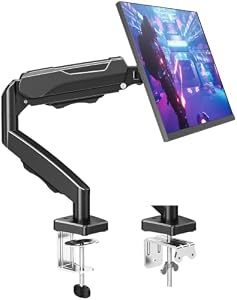
The MOUNTUP is a partial match on the mount element: the word clamp appears in its product name (product name), while its facts describe only a single-point desk attachment. Its stated reach is the longest here, extending 19.4 inches with height adjustment to 16.9 inches. It supports monitors from 4.4 to 19.8 lbs across most 17 to 32 inch flat and curved screens, with VESA 75x75mm and 100x100mm patterns. Motion runs to tilt of -45/+90 degrees, swivel of ±180 degrees and 360-degree rotation, on a steel build with cable channels.
Pros
- Longest stated extension at 19.4 inches, a tenth beyond the WALI
- Lightest stated unit weight at 4.19 lbs
- VESA 75x75mm and 100x100mm patterns both stated, with steel construction
Cons
- Clamp named only in the product name (product name); its facts describe a single-point attachment
- Height reach of 16.9 inches trails the Acer’s 18.1 and the WALI’s 17.3
| Spec | From the listing |
|---|---|
| Load capacity | 4.4-19.8 lbs |
| Extension | Up to 19.4 inches |
| Mount | Clamp (product name) |
| Unit weight | 4.19 lbs |
5. VIVO Single Monitor Desk Mount — Best for ultrawide screens

The VIVO is a full match: its facts state a heavy-duty desk clamp for desks up to 3.25 inches thick, tightened by hand, plus an optional grommet mount in the box. It covers the widest screen range here, most monitors from 13 to 32 inches plus ultrawides up to 38 inches, holding up to 22 lbs on VESA 75x75mm or 100x100mm patterns. Its tilt runs from +90 to -90 degrees, the widest stated span, with 360-degree swivel and rotation, and height adjusts up to 16 inches along the center pole.
Pros
- Desk clamp stated in facts, to 3.25 inches thick, grommet included
- Widest screen coverage: 13 to 32 inches plus ultrawides up to 38 inches
- Widest stated tilt span, +90 to -90 degrees, with 360-degree swivel
Cons
- Height reach of 16 inches is the lowest stated, 2.1 inches under the Acer
- Unit weight missing from its listing, so it cannot be compared with the MOUNTUP’s 4.19 lbs
| Spec | From the listing |
|---|---|
| Load capacity | Up to 22 lbs |
| Mount | Desk clamp, desks up to 3.25 inches thick; grommet included |
| Tilt | +90 to -90 degrees |
| Unit weight | The listing does not state it |
Shopping Checklist
- Match monitor weight to a stated window first: ceilings run 15.4 lbs (HUANUO) to 26.4 lbs flat (WALI); three arms state a 4.4 lb minimum.
- Measure desk thickness first: stated clamp ranges are 0.59 to 3.15 inches (Acer), up to 3.25 inches (VIVO).
- Confirm the mount method on the product page for the HUANUO, WALI and MOUNTUP, whose listings leave the clamp missing or name-only; re-check the HUANUO’s implausible spec-field dimensions there too.
- Check the return window on the product page before ordering, in case the fit is wrong.
FAQ
How do I know whether a clamp mount will fit my desk?
Compare desk thickness with the clamp range stated in the listing: the Acer covers 0.59 to 3.15 inches and the VIVO up to 3.25 inches. Where a listing gives no mount method, as the HUANUO and WALI do, confirm the clamp type and range on the product page.
What load range should I match to my monitor?
Weigh the monitor without its stand and pick an arm whose stated window contains it, including any stated minimum. Windows here run from 4.4 to 15.4 lbs on the HUANUO up to a 26.4 lb ceiling for flat screens on the WALI; curved screens can carry a lower stated limit.
Does it matter if a mount also includes a grommet option?
It can, if your desk has a cable hole or is too thick for the stated clamp range. The Acer and the VIVO both state a grommet alternative; the other three leave mounting options to be confirmed on the product page.
Final Verdict
For a clamp confirmed in the facts, the Acer is the strongest all-round pick, pairing its stated C-clamp with the tallest raise at 18.1 inches; the VIVO matches it on verification, adding ultrawide coverage to 38 inches and the widest tilt span. The WALI states the highest load and the MOUNTUP the longest reach, but both leave the clamp unconfirmed in their facts, as does the HUANUO. Decide on load first, then verify the mount on the product page for any partial match.
Prime covers fast, free delivery on eligible items. See whether a Prime free trial is available for your account.
Check Prime on Amazon →Product and ASIN Reference
| Product | ASIN |
|---|---|
| HUANUO FlowLift Pro Monitor Arm | B0GK7FVTR4 |
| WALI Single Monitor Arm | B0DGPZR6P1 |
| Acer Single Monitor Mount | B0FJBH85MX |
| MOUNTUP Single Monitor Desk Mount | B07Z7ZGHD5 |
| VIVO Single Monitor Desk Mount | B00B21TLQU |

Write Your Review
No reviews yet. Be the first to share your experience!