
Three of these five monitors state a 144Hz refresh rate in their listing facts, and the Acer Nitro KG271 is the cleanest esports pick because it pairs that stated 144Hz rate with a stated 1ms response time on a 27-inch IPS panel. The LG UltraGear reaches 144Hz only when overclocked — its facts state a 120Hz native rate — so it grades as a partial match, and the Sceptre 22-inch lists 144Hz in its product name only, with no refresh figure in its facts, so it is also a partial match; check the product page before relying on either figure.
The MSI states 144Hz in its facts on a 23.8-inch IPS panel, and the SANSUI states up to 160Hz with 144Hz support on a curved 27-inch panel, so both grade as matches alongside the Acer. Sizes run from 22 to 27 inches; only three listings state a response-time figure.
As an Amazon Associate, we earn from qualifying purchases.


Pick by Your Need
- Best for a stated 144Hz rate at 27 inches: Acer Nitro KG271 P6bip. Its facts state 144Hz and 1ms response on an IPS panel.
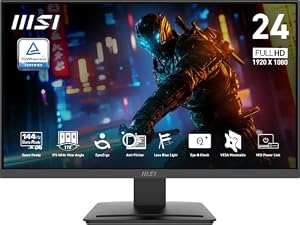
- Best for a stated 144Hz rate in a compact frame: MSI PRO MP243L E14. Its facts state 144Hz on a 23.8-inch IPS panel.
- Best for a curved panel: SANSUI 27 Inch Curved. Its facts state up to 160Hz and list 144Hz support, with a 1500R curve.
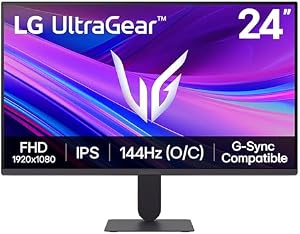
- Best for dual sync support: LG 24G411A-B UltraGear. A partial match: it states G-Sync compatibility and FreeSync, but 144Hz comes only from overclocking a 120Hz native rate.
- Best for built-in speakers: Sceptre 22-Inch E225W-FW144. A partial match: it states integrated speakers, while its 144Hz figure appears in the product name only (product name).
Quick Answer
Start with the Acer Nitro KG271 P6bip: its facts state 144Hz, a 1ms response time, FreeSync and a 27-inch Full HD IPS panel. The MSI also states 144Hz in its facts, on a smaller 23.8-inch IPS panel, and the SANSUI states up to 160Hz with 144Hz support on a curved panel. Treat the LG and Sceptre as partial matches — the LG states 120Hz native with 144Hz only when overclocked, and the Sceptre’s 144Hz appears in its product name only (product name) — so confirm both on the product page.
Comparison Table
| Product | Size stated | Refresh rate stated | Response time | Sync stated | Match |
|---|---|---|---|---|---|
| LG 24G411A-B UltraGear | 24 inches | 120Hz native; 144Hz overclock | 1ms MBR | G-Sync Compatible, FreeSync | Partial match |
| Sceptre 22-Inch E225W-FW144 | 22 inches | 144Hz (product name) | not stated | not stated | Partial match |
| MSI PRO MP243L E14 | 23.8 inches | 144Hz | not stated | FreeSync (product name) | Match |
| SANSUI 27 Inch Curved | 27 inches | Up to 160Hz; 144Hz support | 1ms MPRT | FreeSync | Match |
| Acer Nitro KG271 P6bip | 27 inches | 144Hz | 1ms | FreeSync | Match |
Decision Guide
Decide first whether the 144Hz figure is stated outright. The Acer, MSI and SANSUI listings state 144Hz in their facts and grade as matches. The LG states 120Hz native and reaches 144Hz only through an overclock, and the Sceptre states no refresh figure in its facts — its 144Hz sits in the product name only (product name) — so both grade as partial matches and deserve a product-page check.
Size is the second split: the Sceptre states 22 inches, the MSI states 23.8 inches in its facts (its name lists 24 inches), the LG states 24 inches, and the SANSUI and Acer state 27 inches. The SANSUI is the only curved panel here, at 1500R; the LG, MSI and Acer state IPS panels, while the Sceptre and SANSUI facts leave panel type unstated.
Response time is stated by only three listings: the LG at 1ms MBR, the SANSUI at 1ms MPRT and the Acer at 1ms. The MSI and Sceptre facts state no response figure, so settle that point on the product page for those two.
1. LG 24G411A-B UltraGear 24-Inch — Best for Dual Sync Support
This is a partial match: its facts state a 120Hz native refresh rate and reach 144Hz only when the panel is overclocked, so the headline rate is conditional. The listing states a 24-inch Full HD IPS panel with HDR10, up to 99 percent sRGB coverage, 1ms MBR and both G-Sync compatibility and FreeSync.
Pros
- Facts state both G-Sync compatibility and FreeSync, the widest sync pairing here
- Stated 1ms MBR response alongside the refresh figures
- IPS panel stated with HDR10 and 99 percent sRGB coverage
Cons
- Its 144Hz figure needs the overclock; the native rate its facts state is 120Hz
- The Acer and SANSUI listings state 27-inch panels; this one states 24 inches
| Spec | From the listing |
|---|---|
| Color | Black |
| Size | 24 inches |
| Length | 8.7 inches |
| Width | 21.2 inches |
| Height | 16.2 inches |
| Weight | 7.3 pounds |
2. Sceptre 22-Inch E225W-FW144 — Best for Built-In Speakers
This is a partial match: the 144Hz figure appears in its product name only (product name), and its facts state no refresh rate, response time or panel type. What the facts do state is a 22-inch Full HD design with integrated speakers, Blue-Light Shift and a nearly bezel-free frame. Settle that refresh rate on the product page.
Pros
- Integrated speakers stated in the facts, the only listing here stating them
- Blue-Light Shift stated for reduced blue light in long sessions
- Lightest stated weight here at 7.0 pounds, with a minimal-bezel design
Cons
- Its 144Hz figure rests on the product name only (product name); the facts state no refresh rate
- The LG, SANSUI and Acer listings state 1ms response figures; this one states none
| Spec | From the listing |
|---|---|
| Color | Machine Black |
| Size | 22 inches |
| Length | 7.0 inches |
| Width | 19.9 inches |
| Height | 15.5 inches |
| Weight | 7.0 pounds |
3. MSI PRO MP243L E14 24-Inch — Best Compact Stated 144Hz
This monitor grades as a match: its facts state a 144Hz refresh rate outright, on an IPS panel its facts size at 23.8 inches with Full HD resolution, a 1500:1 contrast ratio and 178-degree viewing angles. One wrinkle: its product name lists the panel as 24 inches while its facts say 23.8 inches, so settle the exact size on the product page. It also states TÜV Rheinland certified Flicker Free and Low Blue Light features plus an Eye-Q Check tool.
Pros
- 144Hz refresh rate stated in the facts with no overclock condition
- Stated 1500:1 contrast ratio with 178-degree viewing angles
- Flicker Free and Low Blue Light stated as TÜV Rheinland certified
Cons
- Its facts size the panel at 23.8 inches while its name lists 24 inches, a conflict to settle on the product page
- The LG listing states G-Sync compatibility in its facts; this listing’s facts leave G-Sync unstated and its FreeSync appears in the product name (product name)
| Spec | From the listing |
|---|---|
| Color | Black |
| Length | 7.13 inches |
| Width | 21.34 inches |
| Height | 15.65 inches |
| Weight | The listing does not state it |
4. SANSUI 27 Inch Curved 160Hz — Best for a Curved Panel
This monitor grades as a match: its facts state a refresh rate of up to 160Hz and list support for 144Hz, though the listing ties the 144Hz and 120Hz figures to the signal source device’s hardware. The stated panel is a 27-inch Full HD screen with a 1500R curve, 1ms MPRT response, FreeSync, a 4000:1 contrast ratio, 300 nits brightness and 110 percent sRGB coverage, plus Game Assistant features such as a crosshair and timer.
Pros
- Highest stated refresh ceiling here at up to 160Hz, with 144Hz support stated
- Stated 4000:1 contrast ratio, the highest stated contrast figure here
- 1500R curved panel, the only curved design here
Cons
- Its stated 144Hz support depends on the signal source device’s hardware, per the listing
- The Acer listing states an IPS panel in its facts; this listing’s facts leave the panel type unstated
| Spec | From the listing |
|---|---|
| Color | Black |
| Size | 27 inches |
| Length | 7.64 inches |
| Width | 24.09 inches |
| Height | 17.8 inches |
| Weight | The listing does not state it |
5. Acer Nitro KG271 P6bip 27-Inch — Best Stated 144Hz All-Rounder

This monitor grades as a match, the most complete esports package on stated figures: its facts state a 144Hz refresh rate, a 1ms response time, FreeSync and a 27-inch Full HD IPS panel with a zero-frame design. Its product name lists HDMI and DisplayPort connections, VESA mounting and 99 percent sRGB coverage.
Pros
- 144Hz refresh rate and 1ms response both stated in the facts
- IPS panel stated at 27 inches with a zero-frame design
- FreeSync stated in the facts for tear-free frame syncing
Cons
- At a stated 8.36 pounds it is the heaviest stated weight here
- The LG listing states HDR10 in its facts; this listing’s facts leave HDR unstated
| Spec | From the listing |
|---|---|
| Color | Black |
| Size | 27 inches |
| Length | 8.28 inches |
| Width | 24.1 inches |
| Height | 18.25 inches |
| Weight | 8.36 pounds |
Shopping Checklist
- Measure your desk space first and match it to the stated panel size, 22 to 27 inches here.
- Check whether the 144Hz figure is stated in the facts, needs an overclock, or appears in the product name only, as with the two partial matches here.
- Confirm refresh rate, response time and panel type on the product page for any listing that leaves one unstated.
- Check the return window on the product page before you buy.
- Compare two or three finalists on stated refresh, response and sync support, and do not buy a size you did not measure.
FAQ
How do I tell whether a monitor really runs at 144Hz?
Look for the refresh rate in the listing facts rather than the product name alone. Here, the Acer, MSI and SANSUI facts state 144Hz or higher, the LG states 120Hz native with 144Hz only under overclock, and the Sceptre states its 144Hz in the product name only (product name). Confirm the native rate on the product page.
Does panel size matter for esports monitors?
Size changes how much of the screen sits in your central view. These listings state panels from 22 to 27 inches, all at Full HD resolution, so larger panels spread the same pixel count over more area. Measure your desk and viewing distance first.
What else should I check besides refresh rate?
Check stated response time, sync technology and panel type. Three listings here state a 1ms response figure and two leave it unstated; the LG states both G-Sync compatibility and FreeSync while others state FreeSync alone. Confirm any unstated figure on the product page.
Final Verdict
For a straightforward esports buy, take the Acer Nitro KG271 P6bip: it states 144Hz, 1ms response, FreeSync and an IPS panel in its facts. The MSI is the smaller alternative with 144Hz stated outright, and the SANSUI adds a curved panel with up to 160Hz stated and 144Hz support tied to your source hardware. The LG and Sceptre remain partial matches — the LG reaches 144Hz only by overclocking a 120Hz native rate, and the Sceptre’s 144Hz rests on its product name only (product name) — so settle both on the product page first.
Prime covers fast, free delivery on eligible items. See whether a Prime free trial is available for your account.
Check Prime on Amazon →Product and ASIN Reference
| Product | ASIN | Grade |
|---|---|---|
| LG 24G411A-B UltraGear | B0FLL354M2 | Partial match — 144Hz overclock only; 120Hz native stated |
| Sceptre 22-Inch E225W-FW144 | B0FT21HKZ6 | Partial match — 144Hz in product name only |
| MSI PRO MP243L E14 | B0FG5XLWNV | Match |
| SANSUI 27 Inch Curved | B0F2T7WLFK | Match |
| Acer Nitro KG271 P6bip | B0FJS2BVXS | Match |
Write Your Review
No reviews yet. Be the first to share your experience!