
The ASUS ProArt PA278QV is the standout pick for digital painting: it is the only listing that states verified color accuracy, with Calman verification, a Delta E below 2, and full stated coverage of the sRGB and Rec. 709 gamuts at 2560×1440. The other four trade that verification for other stated strengths: 4K resolution, a USB-C input, extra USB ports, or a stated sRGB gamut on a gaming panel.
One caution runs through the set. The LG 27US500-W grades as a partial match, because its 27-inch size appears in its product name only (product name) and its spec table lists dimensions and weight without any size figure, so confirm the size on the product page. The Sceptre states full sRGB coverage but gives no resolution figure, and the Amazon Basics states the lowest resolution, 1920×1080.
As an Amazon Associate, we earn from qualifying purchases.


Pick by Your Need
- Best for verified color accuracy: ASUS ProArt PA278QV. Calman Verified, Delta E below 2, and stated 100 percent sRGB and Rec. 709 coverage.
- Best for 4K canvas detail: LG 27US500-W UltraFine. Stated 3840×2160 resolution and up to 90 percent DCI-P3; partial match — the 27-inch size rests on its product name only (product name).
- Best for a USB-C desk setup: Kenowa 27 Inch Second Monitor. QHD 2560×1440 resolution, USB-C and HDMI inputs, and a stated 100Hz refresh.
- Best for stated sRGB on a gaming panel: Sceptre 27-inch Prime. Stated 100 percent sRGB coverage and 100Hz refresh; its listing gives no resolution figure.
- Best for plugging in peripherals: Amazon Basics 27 Inch Monitor. Four stated USB ports and an IPS panel at 1920×1080.
Quick Answer
Start with the ASUS ProArt PA278QV if color accuracy drives your painting work: it states the fullest color data here, with 100 percent sRGB and Rec. 709 coverage plus Calman verification. Choose the LG 27US500-W for a stated 3840×2160 resolution, but treat it as a partial match: its 27-inch size comes from its product name only (product name), so settle it on the product page. The Kenowa is the middle route, with QHD resolution and USB-C. The Sceptre states 100 percent sRGB with its resolution unstated; the Amazon Basics states the lowest resolution here.
Comparison Table
| Product | Resolution stated | Color coverage stated | Refresh rate stated | Match |
|---|---|---|---|---|
| Sceptre 27-inch Prime | not stated | 100 percent sRGB | 100Hz | Match |
| LG 27US500-W UltraFine | 3840×2160 | Up to 90 percent DCI-P3 | not stated | Partial match — size in product name only |
| Kenowa 27 Inch Second Monitor | 2560×1440 | 100 percent color gamut, gamut unnamed | 100Hz | Match |
| ASUS ProArt PA278QV | 2560×1440 | 100 percent sRGB, 100 percent Rec. 709 | not stated | Match |
| Amazon Basics 27 Inch Monitor | 1920×1080 | not stated | 100Hz (product name) | Match |
Decision Guide
Resolution is the first split. The LG states the highest figure at 3840×2160, the ASUS and Kenowa each state 2560×1440, and the Amazon Basics states 1920×1080, the lowest here. The Sceptre states no resolution at all, so its sharpness waits for the product page.
Color data splits the set further. The ASUS states the deepest bench: 100 percent sRGB, 100 percent Rec. 709, Calman verification and a Delta E below 2. The LG states up to 90 percent DCI-P3 with HDR10 support; the Sceptre states 100 percent sRGB, unverified. The Kenowa states a 100 percent color gamut without naming which gamut, so it cannot be lined up against the named figures. The Amazon Basics states no gamut figure at all.
Size basis and desk fit close the decision. Four listings state the 27-inch size in their facts or spec tables; the LG’s size comes from its product name only (product name), hence its partial grade. Stated weights run from 7.21 pounds (Sceptre) to 17.0 pounds (ASUS), and the Kenowa’s spec table gives dimensions without a weight.
1. Sceptre 27-inch Prime Gaming Monitor — Best for Stated sRGB on a Gaming Panel

This gaming monitor states 100 percent sRGB coverage, a 100Hz refresh rate, two HDMI ports and one DisplayPort input, plus built-in speakers. Its 27-inch size is stated in its spec table, so it matches on size and type. The gap is resolution: the listing gives no resolution figure, and its 1ms response figure appears in its product name only (product name), so settle both on the product page.
Pros
- Stated 100 percent sRGB color gamut coverage
- Stated 100Hz refresh rate across two HDMI ports and one DisplayPort
- Lightest stated weight here at 7.21 pounds, with built-in speakers
Cons
- The ASUS and Kenowa state 2560×1440 resolutions; this listing gives none, so check the product page
- The LG states up to 90 percent DCI-P3 coverage; this listing states sRGB coverage instead
| Spec | From the listing |
|---|---|
| Color | Machine Black |
| Size | 27 |
| Length | 7.66 inches |
| Width | 24.13 inches |
| Height | 17.21 inches |
| Weight | 7.21 pounds |
2. LG 27US500-W UltraFine 4K Monitor — Best for 4K Canvas Detail
This is a partial match: the 27-inch size appears in its product name only (product name), and its spec table lists color, dimensions and weight with no size row, so confirm the size on the product page. Its stated facts are strong for artwork: 3840×2160 resolution, up to 90 percent DCI-P3 coverage, HDR10 support and a 1000:1 contrast ratio. Its IPS panel type also rests on its product name only (product name).
Pros
- Highest stated resolution here at 3840×2160
- Stated up to 90 percent DCI-P3 coverage with HDR10 support
- Stated 1000:1 contrast ratio and an ergonomic tilt stand
Cons
- Its 27-inch size rests on the product name only (product name); the other four state the size in facts or spec tables
- The ASUS states Calman verification and Delta E below 2; this listing gives gamut and contrast without accuracy verification
| Spec | From the listing |
|---|---|
| Color | White |
| Size | The listing does not state it |
| Length | 8.46 inches |
| Width | 24.15 inches |
| Height | 17.87 inches |
| Weight | 12.13 pounds |
3. Kenowa 27 Inch Second Monitor — Best for USB-C and QHD
The Kenowa states its 27-inch size directly in its facts, alongside a QHD 2560×1440 IPS screen, a stated 1300:1 contrast ratio and 350 nit brightness. USB-C and HDMI inputs link it to laptops, PCs and consoles, FreeSync support pairs with the stated 100Hz refresh rate, and speakers are built in.
Pros
- Stated 2560×1440 QHD resolution on an IPS screen
- USB-C and HDMI inputs, the only stated USB-C connection here
- Stated 1300:1 contrast ratio and 350 nit brightness
Cons
- Its stated color figure is an unnamed 100 percent gamut; the ASUS states sRGB and Rec. 709 by name
- The other four listings state a weight; this spec table lists dimensions only, so check the product page first
| Spec | From the listing |
|---|---|
| Color | black |
| Size | 27″ |
| Length | 23.3 inches |
| Width | 4.9 inches |
| Height | 15.3 inches |
| Weight | The listing does not state it |
4. ASUS ProArt PA278QV Professional Monitor — Best for Verified Color Accuracy
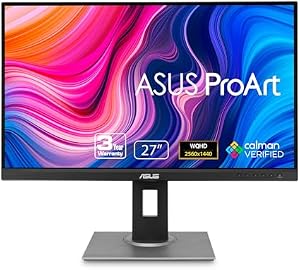
The ProArt is the purpose-built creative entry: its facts state a 27-inch WQHD IPS display at 2560×1440, Calman verification, a Delta E below 2, and full stated coverage of the sRGB and Rec. 709 gamuts. Its stand is height adjustable, and ProArt Preset and Palette controls adjust color, brightness and black levels.
Pros
- Calman Verified with a stated Delta E below 2 for color accuracy
- Stated 100 percent sRGB and 100 percent Rec. 709 gamut coverage
- Height-adjustable stand and a stated 2560×1440 IPS panel
Cons
- At a stated 17.0 pounds it is the heaviest here; the Sceptre states 7.21 pounds
- The Sceptre and Kenowa state 100Hz refresh rates; this listing’s facts give no refresh figure
| Spec | From the listing |
|---|---|
| Color | BLACK |
| Size | 27 inches |
| Length | 15.04 inches |
| Width | 24.21 inches |
| Height | 8.9 inches |
| Weight | 17.0 pounds |
5. Amazon Basics 27 Inch IPS Monitor — Best for Plugging in Peripherals
This monitor states its 27-inch size in its facts, with an IPS LCD panel at a stated 1920×1080 Full HD resolution and built-in speakers. Its distinguishing feature is desk connectivity: four built-in USB ports take a keyboard and mouse through the monitor, and its name adds VESA compatibility (product name). Its 100Hz refresh figure appears in its product name only (product name); the facts state panel, resolution, ports and audio without a refresh rate.
Pros
- Four stated USB ports for peripherals, the most stated here
- Stated 27-inch IPS panel with built-in speakers
- VESA mounting compatibility (product name)
Cons
- Its stated 1920×1080 resolution is the lowest here; the ASUS and Kenowa state 2560×1440 and the LG states 3840×2160
- The ASUS states named coverage at 100 percent sRGB and Rec. 709; this listing’s facts give no gamut figure
| Spec | From the listing |
|---|---|
| Color | Black |
| Size | 27″ |
| Length | 24.07 inches |
| Width | 9.05 inches |
| Height | 17.96 inches |
| Weight | 8.38 pounds |
Shopping Checklist
- Measure your desk space first, then check each finalist’s stated dimensions and weight.
- Check each finalist’s stated resolution; where a listing gives none, settle it on the product page.
- Check stated color coverage by name — sRGB, DCI-P3 or Rec. 709 — and treat an unnamed gamut as unverified.
- Confirm panel size on the product page whenever a spec table leaves the size row out.
- Compare two or three finalists side by side on stated resolution and gamut.
- Check the return window on the product page before ordering, and do not buy a size you did not measure.
FAQ
What resolution should a 27-inch monitor for digital painting have?
Work from the stated figures. A stated 2560×1440 resolution, as the ASUS and Kenowa list, gives more canvas detail than the 1920×1080 the Amazon Basics states, and the LG states 3840×2160. Where a listing states no resolution, as the Sceptre’s does, check the product page instead.
Why do stated color gamut figures matter for digital painting?
The gamut figure tells you which color space the panel states it can reproduce. The ASUS states 100 percent sRGB and Rec. 709 with Calman verification, the LG states up to 90 percent DCI-P3, and the Sceptre states 100 percent sRGB. An unnamed figure, like the Kenowa’s stated 100 percent color gamut, cannot be compared directly with those named spaces, so confirm it on the product page.
How do I confirm a monitor’s size before buying?
Check whether the size appears in the listing’s facts or spec table, not only in the product name. Four of these five listings state 27 inches in their data; the LG’s rests on its product name only (product name), hence its partial grade. Settle any size resting on a name alone on the product page.
Final Verdict
For digital painting, the ASUS ProArt PA278QV is the clearest first choice: it states its 27-inch size, a 2560×1440 resolution, and the only verified accuracy data. The LG 27US500-W states the highest resolution and DCI-P3 coverage, but stays a partial match until its name-only size is confirmed on the product page. The Kenowa suits a USB-C desk at QHD, the Sceptre suits stated sRGB coverage pending a resolution check, and the Amazon Basics suits a peripheral-heavy desk that can accept the lowest stated resolution.
Prime covers fast, free delivery on eligible items. See whether a Prime free trial is available for your account.
Check Prime on Amazon →Product and ASIN Reference
| Product | ASIN | Grade |
|---|---|---|
| Sceptre 27-inch Prime | B0CHHSFMRL | Match |
| LG 27US500-W UltraFine | B0D9R7Q449 | Partial match — 27-inch size in product name only |
| Kenowa 27 Inch Second Monitor | B0GF1HZ12X | Match |
| ASUS ProArt PA278QV | B088BC5HMM | Match |
| Amazon Basics 27 Inch Monitor | B0CP7RZRMD | Match |

Write Your Review
No reviews yet. Be the first to share your experience!